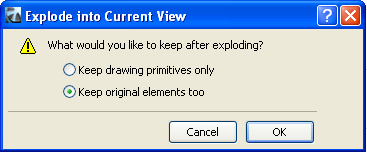
Choosing Edit > Reshape > Explode into Current View will turn selected elements (Floor Plan and other 2D windows only) into 2D drawing primitives (Lines without arrowheads, Circles, Arcs, Elliptic arcs, Splines, unframed Fills, single-line Texts).
You have the option to delete or keep original elements.
Note: The Explode command will not affect grouped or locked elements. Turn on Suspend Groups before exploding grouped elements.
Note that exploding a construction element with the first option (Keep drawing primitives only) means that it no longer exists as a construction element. Consequently, it will disappear from other model views (model-type Sections, Elevations, IEs, 3D Documents).
Keep Drawing primitives on elements’ original layers
This third option (a checkbox) appears if the exploded Drawing contains layers (that is, if it is a DWG file or if it is derived from an ArchiCAD view):
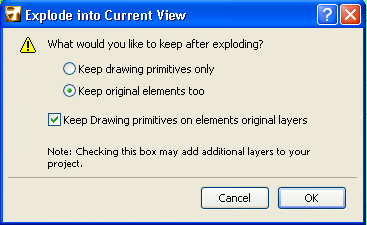
(Original layers are the same layer as the Drawing’s layer). If you uncheck this box, you may avoid creating large numbers of unneeded layers in ArchiCAD.
After an Explode function, you may wish to fine-tune the view before final output. You will find, however, that the “exploded” lines and fills often contain superfluous elements (extra line segments, overlapping or superfluous fills) that make such editing difficult.
To make editing easier, first use the Linework and Fill Consolidation functions on selected items in the window.
For more information, see Consolidate Lines and Fills in Drawing Windows.
Some examples:
•Slabs, Roofs and Meshes are decomposed into lines.
•Walls and Columns are decomposed into Lines and Fills (Doors and Windows inserted into Walls are also exploded).
•Doors and Windows (if selected without the Wall they are placed into) are decomposed like GDL Objects into 2D elements and are replaced by empty hole type openings.
•Dimensions are decomposed into Lines, Texts and the basic elements of arrowheads (Lines, Circles, Arcs, Fills).
•Polylines are decomposed into Lines and Arcs.
•GDL Objects are decomposed into basic 2D drawing elements.
Explode has no effect in the following cases:
•In Section/Elevation/IE and 3D Document windows, cut construction elements cannot be exploded.
•Section/Elevation/IE lines and Cameras.
•Basic 2D elements.