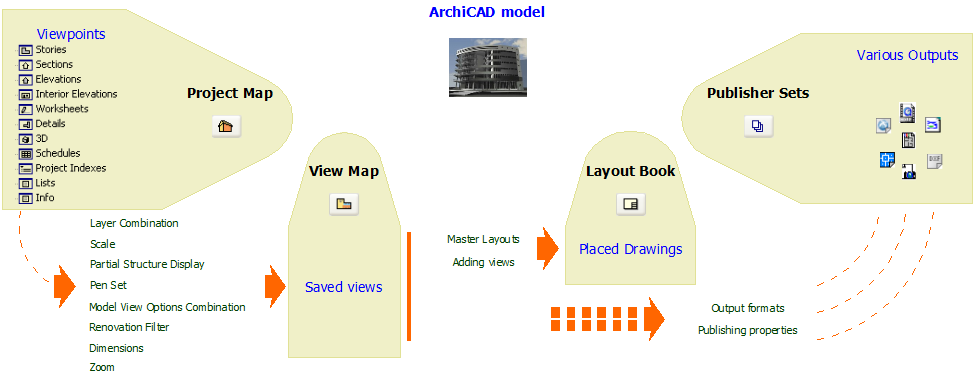
Project Workflow in the Navigator
A Viewpoint represents a window onto a particular part of your project, but its settings have not been saved yet. Viewpoints are listed in the Project Map of the Navigator Palette.
See Navigator Palette.
A View is a stored version of a Viewpoint; each view is defined by its adjustable View Settings that you configure for a particular purpose as you construct your Virtual Building. Every saved view is listed in the View Map.
The Layout Book contains the layouts defined for the entire architectural project, and can contain Drawings originating from multiple ArchiCAD project files and other source files. A view placed on a Layout is called a Drawing.
Use the Publisher to set up the items you want to publish, and set the publishing method and format. Each Publisher item refers directly to a View or to a Layout (in effect, the Publisher item is a shortcut to the View/Layout).
The following diagram summarizes the project workflow as reflected in the maps of the Navigator: