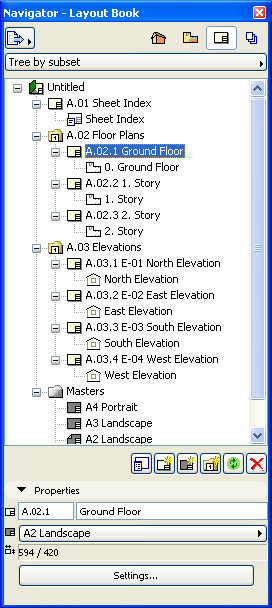
The Layout Book is a tree view of the Layouts defined for the entire project, plus the Drawings on the Layouts. Drawings in the Layout Book can originate from multiple ArchiCAD project files and other source files. A view placed on a Layout is called a Drawing.
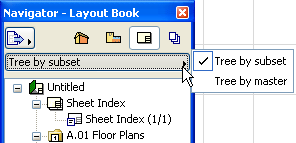
You can view the Layout Book in two formats: Tree by Subset or Tree by Master. Click the pop-up button above the tree to choose a format.
•Tree by Subset (the default display) lists layouts according to the Subsets you have created - a freely defined logic. (The primary function of Subsets is to enable you to assign a customized numbering system.)
See Subsets.
•Tree by Master lists the Layouts in categories according to their Master Layouts.
At the bottom of the Layout Book, the Properties section displays the settings of the current Layout, some of which are editable directly.
See also The Layout Book and Layout Book Controls.
To access the Settings of the selected Layout or the selected Drawing, click the Settings button at the bottom of the Layout Book.
Drawings are accompanied by icons that correspond to their file type. Views imported from ArchiCAD project files retain their icons (for example, floor plan or detail) but are shown in white.