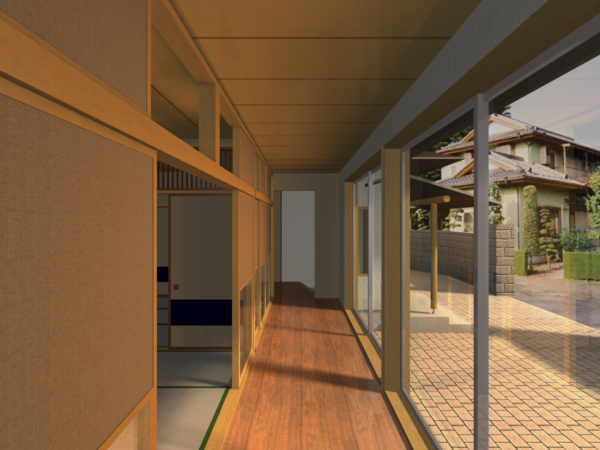
This example uses a Japanese house.
A SkyObject and SunObject are both placed on the Floor Plan for exterior lighting. The way their parameters are set is very similar to the Exterior example. Also, surface shader definitions are done the same way.
Since the rendering will show the interior corridor of the house, we placed two WindowLight lamps on the two large window panes separating the inside corridor from the exterior space.
Their purpose is to simulate the diffuse light coming through the window panes.

Make the WindowLight lamp’s Width and Height the same size as the Window it is placed for. Place the WindowLight lamp in front of the Window frame so it is closer to the interior than the Window.

If you look at it in 3D, you can see the small spheres that show the individual light sources of the WindowLight lamp. Their number is automatically calculated and is influenced by the Light Intensity and Light Resolution parameters of the lamp.

Note: these light source spheres are visible in 3D only if the 3D Engine is set to OpenGL Engine.
The purpose of this rendering was to create fine soft shadows. The final settings of the WindowLight lamp for this particular scene include Shadow Quality set to 4, which is almost the maximum value.
The next image shows the final rendering. Note the fine reflections on the ceiling of the corridor. Also, see the softness of the shadow cast by the divider column between the two Windows. See how the shadow is harder close to the column and softer toward the inner side of the corridor as more and more diffuse light from other areas of the windows reaches it. We needed the SunObject lamp placed to achieve this since Ambient and Camera lights do not cast shadow, and the SkyObject lamp casts shadow from various points on a hemisphere. The SunObject provided the necessary amount of concentrated light to achieve this effect.