Importing MEP Content into ArchiCAD
The two most commonly used file formats to import data from MEP applications to ArchiCAD are DWG and IFC.
Importing MEP Data via DWG
MEP data from engineers that use AutoCAD arrives in DWG format. The best practice is to import only the MEP content, plus the structural grid added for reference. Import the received MEP content in ArchiCAD either as an XREF or place as a Drawing. ArchiCAD’s Drawing Tool includes an Embedded Layer Visibility Setting, which enables the switching of layers on and off within the drawing content.
For further information, see Show/Hide Layers of Imported DWG/DXF/DWF Files.
For importing MEP content into ArchiCAD via IFC, software-specific export extensions are offered by GRAPHISOFT, enabling seamless integration of the imported MEP design into the architectural model. It is possible to open the files created by these export extensions using any software that opens IFC, as they are not written in a custom format but are standard IFC files carrying some additional information that aid the element translation process for ArchiCAD.
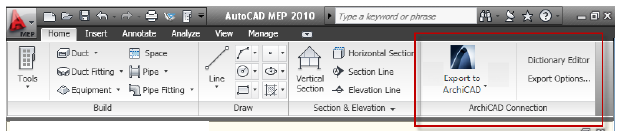
•ArchiCAD Connection for AutoCAD MEP
GRAPHISOFT provides a free AutoCAD MEP plug-in called ArchiCAD Connection for AutoCAD MEP, which enables advanced file export to ArchiCAD, using IFC format optimized for GRAPHISOFT MEP Modeler. As part of this add-in, you can define custom dictionaries for element conversion; these custom element assignments will overwrite the default assignments between the exported MEP objects and GRAPHISOFT MEP Modeler objects. The ArchiCAD Connection for AutoCAD MEP plug-in is available for free download from http://www.graphisoft.com/support/archicad/downloads/interoperability/.
•GRAPHISOFT MEP Export to ArchiCAD
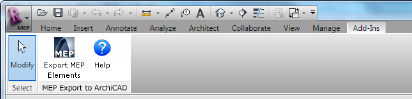
GRAPHISOFT provides a free Revit MEP Add-In with an option to export to ArchiCAD, using IFC format optimized for GRAPHISOFT MEP Modeler.
The installer for the GRAPHISOFT MEP Export to ArchiCAD Add-In is available from GRAPHISOFT’s website at:
http://www.graphisoft.com/support/archicad/downloads/interoperability/.
These solutions provided by GRAPHISOFT create IFC files by filtering the model to only include elements of the MEP design. Unlike with an imported DWG file, it is less important to include the structural grid in the IFC file, because IFC files carry coordinate information by default. Thus, the content created in the 3D MEP applications is automatically placed correctly when merged into the ArchiCAD project.