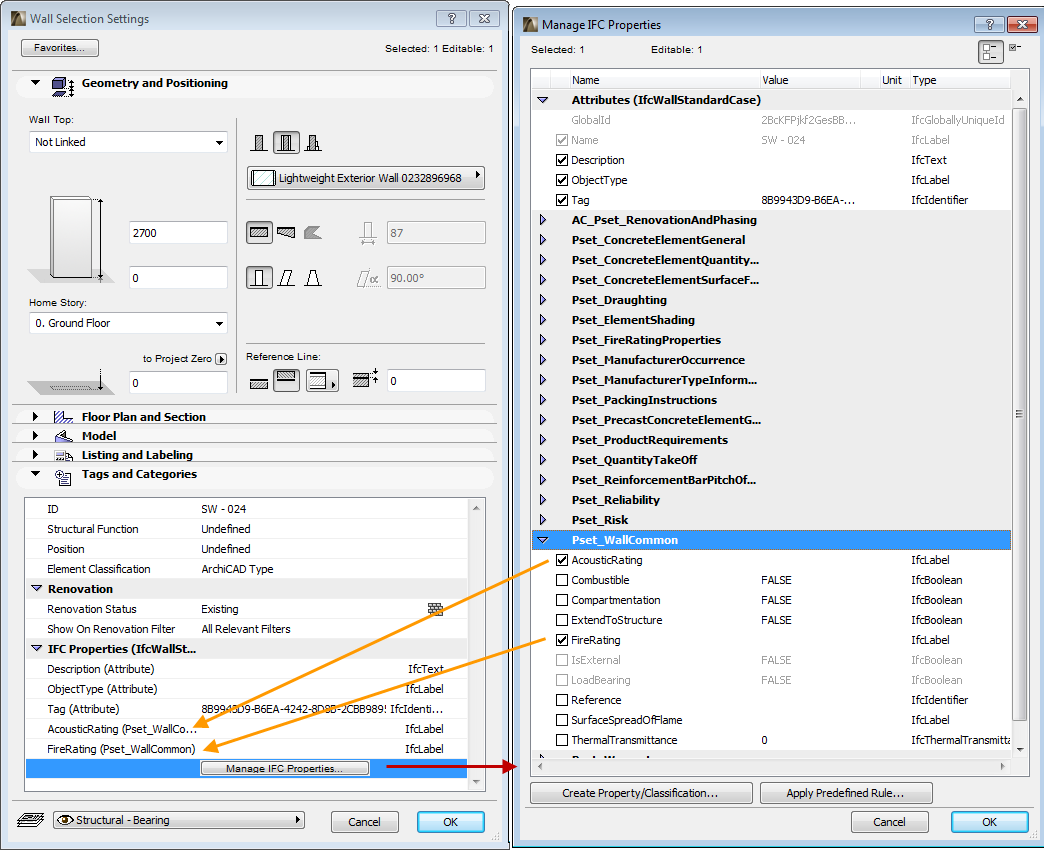
ArchiCAD elements created out of imported IFC model elements display their standard and custom IFC data, at the element level, in their respective Settings dialog boxes (Tags and Categories panel).
Note: Imported IFC elements and their properties (depending on the translator used) generally (by default) are protected against modification in accordance with the Reference model concept. Of course, by activating the layers of those elements, those elements too can be modified as needed.
Similarly, you can use the IFC options in Element Settings to manage (define and edit) IFC data (Attributes, standard and custom Properties and Classification References) for searching (Find & Select), scheduling, and IFC model export purposes. New IFC data can be added to (or removed from) the related elements manually or automatically based on predefined rules in the Manage IFC Properties dialog.
See Creating and Editing IFC Data.
Note: The available standard IFC Attribute and Property data types depend on the element’s “Element Classification” value. For example, if an ArchiCAD Wall element is classified as “ArchiCAD Type,” then its IFC Entity will be (depending on its geometry) either an IfcWallStandardCase (e.g. straight wall), or an IfcWall (e.g. slanted wall). Its IFC Entity type will be displayed in parentheses in the “IFC Properties” list, and only those standard IFC data sets will be available which correspond to that type (e.g. the Pset_WallCommon Property Set). If its classification is “Column”, for example, then the IFC standard properties corresponding to IfcColumn will be available (e.g. the Pset_ColumnCommon properties).
The new data will appear under IFC Properties, where you can assign values according to the particular value type (single or multiple value, Real, Integer, Label, Text, or Boolean, etc.).