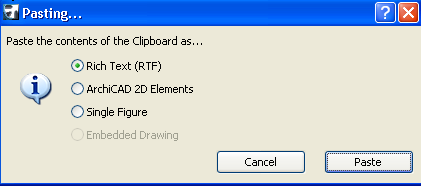
This dialog box appears if you have copied drawing, image or text elements from an external application to the clipboard, and you want to paste the clipboard contents into ArchiCAD.
•Rich Text (RTF): If you choose this option, the result will be a plain pasting operation. If the selection contains graphics, they will be lost, but the text elements will be directly editable in ArchiCAD as part of a Text Block.
•ArchiCAD 2D Elements: This option will also result in a plain pasting operation, with elements exploded into ArchiCAD drawing elements. Since the clipboard contents are treated as graphical elements, you may find that some text elements are not entirely accurate, but graphic elements will be properly displayed.
•Single Figure: This option will not explode the contents, but retain them in a single, uneditable Figure.
•Embedded drawing: This option is available if the clipboard contents consist of part of a PDF document.