Improved Intersections in ArchiCAD 17
A greatly improved Intersection method allows the intersection priority within the Building Material to work among all construction elements - including single-skin, Composite and Profiled elements.
Benefits of the improved Intersections:
•Colliding elements, such as Walls and Slabs in Section and 3D, will automatically clean up based on skin priority from the Building Material
•Changing Partial Structure Display will correctly display Surfaces from the Building Material
•Using Marquee and 3D Cutting Planes can display the correct cut skins of Composites and Profiles
Migration Default: Your Intersections Are Preserved in “Legacy Mode”
If you migrate an older-version project to ArchiCAD 17, the Legacy Mode for element intersections is turned on by default to maintain the appearance of your model. This means that you will not see any changes in your element intersections.
Note: When you create a new file from the template, this legacy checkbox is off by default and the new intersections method is enabled.
How to Keep Old Intersections: Legacy Mode for Migrated Files (Default)
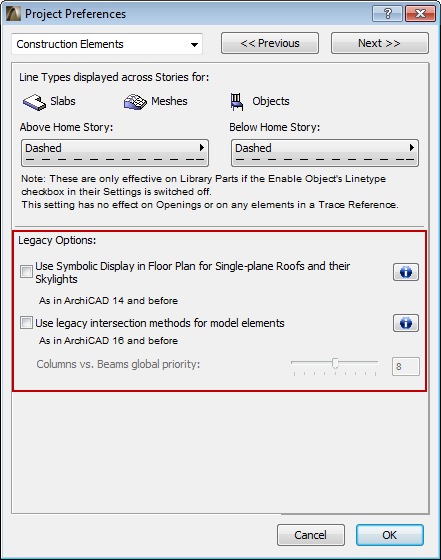
After you migrate a project to ArchiCAD 17 and optimize the attributes, the project will still be using the “legacy intersection method” by default to maintain intersections as per ArchiCAD 16 and before.
In Legacy Mode, the new Intersections logic in ArchiCAD 17 will not take effect in 3D. Intersection methods from ArchiCAD 16 and earlier versions will be used. You may prefer this when working on an older project, to ensure that your existing intersections remain intact.
Legacy Mode is controlled in Options > Project Preferences > Construction Elements.
Note that in Legacy Mode:
•the Building Material attribute is available, but the new priority-based connections will not take effect in 3D (except for Walls, where they will work as in ArchiCAD 16 and earlier versions)
•the Surfaces assigned to Building Materials are not displayed. Only element-level surfaces can be shown.
For specifics on how this checkbox affects intersections of the different construction elements in Legacy Mode, click the Info button in the dialog box.
How to Enable New Intersections in ArchiCAD 17 (Turn off Legacy Mode)
The new Intersection method introduced in ArchiCAD 17 can be enabled by turning off the “legacy intersection method” found under Project Preferences > Construction Elements.
After this legacy checkbox is turned off, your models’ intersections may appear different. It is advised to review the model, make necessary amendments to the model geometry and also check for previous workarounds that may no longer be necessary (for example 2D patching or SEO).
Existing intersections that do not involve geometric element collision will not clean up automatically. If you want automatic intersections to take effect for these, a number of new features in ArchiCAD 17 assist you in achieving collisions, thereby allowing the automatic intersection logic to take effect.
See Tips for Better Intersections in Migrated Projects.
Any newly placed elements whose collisions are modeled using the new modeling methods will clean up as expected for ArchiCAD 17.
Tips for Better Intersections in Migrated Projects
If you have migrated your project to ArchiCAD 17 and wish to use the new Intersections logic on your older-version model, see the following section for techniques and features to optimize your model intersections.
See How to Make Sure Elements Collide for Best Cleanup Results.
For more information, see also Element Intersections.