Phase-out of Images in QuickTime Formats
Image file formats created with QuickTime are being phased out, to ensure long-term compatibility for image files on both Windows and MacOS. ArchiCAD 17 will still read all Quick Time formats, but later versions may not.
The image formats to be supported are: JPEG, PNG, GIF, TIFF and BMP. You can save image files only to these formats.
If you migrate an older-format ArchiCAD project that contains figures or drawings in a different file format than these:
1.Figures and embedded drawings: converted automatically.
Any images placed with the Figure tool and any embedded drawings that are in QuickTime based formats are converted automatically into a supported image file format (e.g. png); no action is needed.
2.Linked Drawings: you can convert and re-link them.
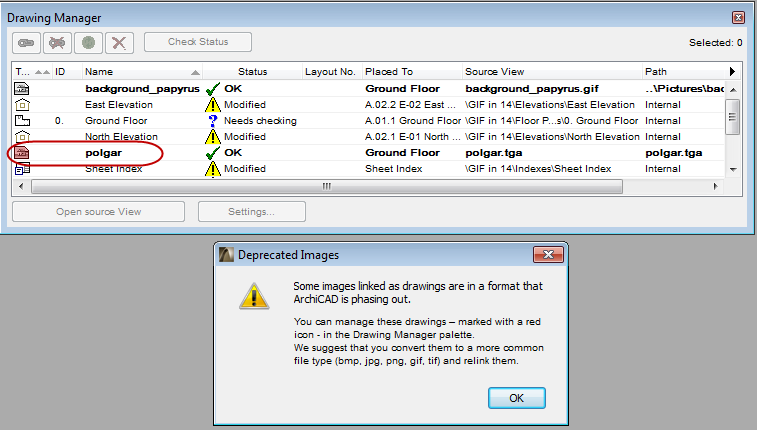
Any linked drawings that are in QuickTime based formats are still supported in ArchiCAD 17. However, to avoid problems in future versions of ArchiCAD, you can convert these images to other file formats. If you have such linked drawings in your migrated project, a warning appears when you open the project in ArchiCAD 17.
You can manually convert these linked drawings into a supported image file format. To do this, go to Drawing Manager: these drawings’ icons are shown in red. It is recommended to convert these images to a supported file format (e.g. PNG or JPG), then re-link them.
Note: If you do not convert your linked QuickTime-format drawings, they will still work in ArchiCAD 17. However, if you should open the project in a later version of ArchiCAD, those image files will not be read.
Recommendation
It is recommended to convert your QuickTime-format drawings to either PNG or JPG format.
•If you convert a drawing to PNG format, you will not lose any data from the drawing.
•If you convert a drawing to JPG, you will lose some data during the file compression process, but the file size will be smaller.