Graphical Interface: Better than Ever
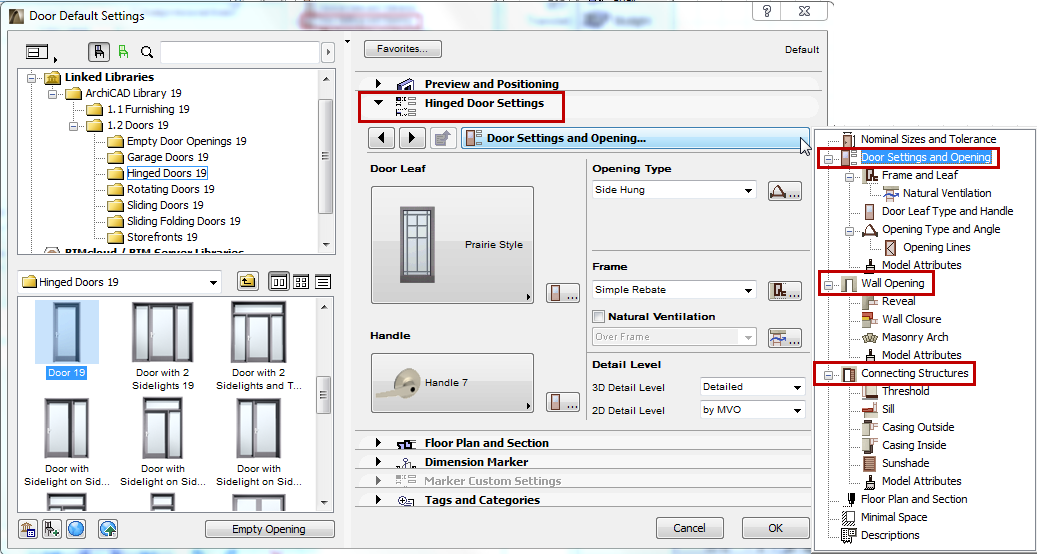
The controls of Door/Window Settings - until now, overly complex and often redundant - are much friendlier. In ARCHICAD 19, finding and setting Door/Window parameters is more intuitive and therefore much faster.
•All Door/Window parameters are available in a graphical interface on the Custom Settings panel, and grouped into a logical hierarchy
•For fast, simple setup of doors and windows: once you have defined the shape and size, you only need to check the three main tab pages: Door/Window Settings, Wall Opening, and Connecting Structures.
•If you want to set additional details, use the additional tab pages within the hierarchy, or access them with shortcuts from the main pages
•Model (3D) attributes are grouped under the three main tab pages, while all Floor Plan and Section attributes are together on one tab page
•Icons and picture pop-ups have been redesigned
Updated Tab Page Selector
•Smoother workflow: after you navigate to a settings page, double-click to close the tab page selector and then you can edit the settings right away (earlier version required an extra click)
•Back/forward arrows for faster page turning
•Tab page tree view is dynamically resized when re-opened
•Vertically resize the tab pages which contain only a list
More Compact Door/Window Dialog Box
Now that many Door/Window parameters have been restructured, several panels of the Settings dialog box are no longer needed. These have been eliminated or hidden. The result: a more compact interface.
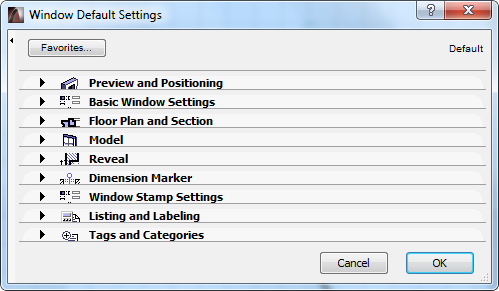
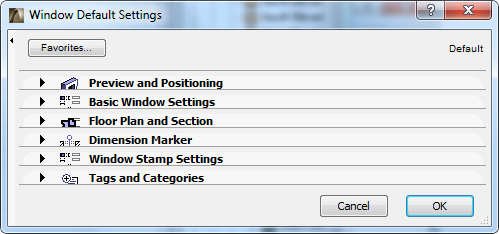
Window Settings Dialog Box in ARCHICAD 18 (left) and ARCHICAD 19 (right)
•No More Parameter List
Since the custom interface now contains all needed parameters, the Parameter List is superfluous, and has been removed for all doors and windows in the GS library.
•No More Reveal Panel
The separate Reveal Panel has been eliminated from the settings dialog, but its controls are still available (in the Reveal tab of the new hierarchical structure) for library parts that use these settings.
•No More Model Panel
In earlier versions, the Model Panel contained few, rarely used controls.
In ARCHICAD 19:
•The Model Panel is hidden by default, but can be enabled using the Work Environment’s Tool Settings controls
•Wall Opening Surface settings have been moved to the Custom Settings panel
•Undo All Crops command is now at Design > Roof Extras
•No More Listing and Labeling Panel
As part of the Label Improvements project for ARCHICAD 19, this panel has been renamed to “Listing”, and by default it is hidden in all Tool Settings dialog boxes.
•Improved Floor Plan and Section Panel
•“Enable Object’s Attributes” was replaced by “Override Object’s Attributes” for a better understanding of the interface
•Irrelevant settings for all Floor Plan Display types are hidden
•New icons make it easier to differentiate parameters