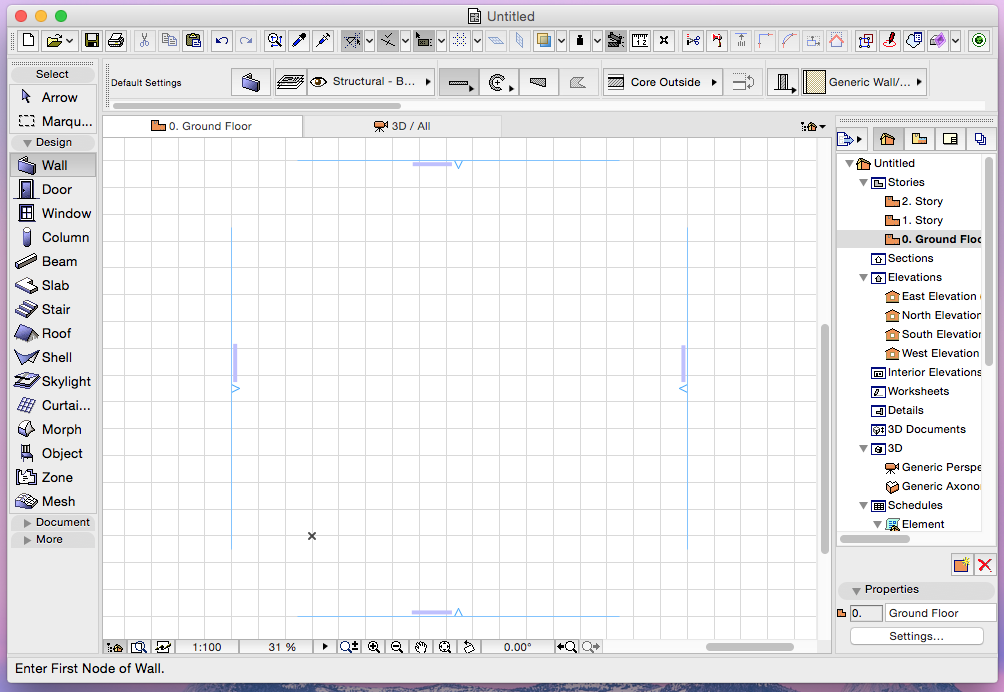
Mac Interface: Unified Window Mode with Docking Palettes
The unified-window ARCHICAD interface is now implemented for Mac (already available on Windows), with support for Full Screen mode.
•Resize the entire ARCHICAD interface easily
•Switch to full screen mode with only one click
•Palettes can be docked/undocked in the main ARCHICAD interface, so users won't get lost in the interface of other running applications, or have their window headers disappear behind palettes
•Mac only: Undock windows and move to separate displays
•Mac only: Access the project’s file path from the application header
•More consistent interface between platforms means easier transfer of Work Environment
See also Unified Window Mode on Mac and Dock or Undock Palettes or Toolbars in the ARCHICAD Reference Guide.
Other Workspace Improvements
•Show/Hide All Palettes with one-click menu command
•Change your Work Environment Profile more easily, with a menu command instead of the Work Environment dialog box (Options > Work Environment > Apply Work Environment Profile)