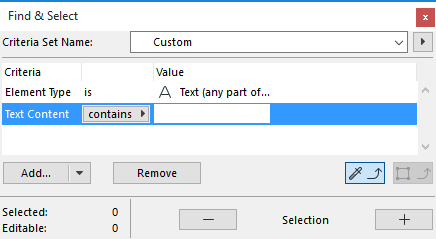
Find and Select Text Blocks/Labels
Use the Find & Select function to locate text blocks or label texts whose content matches or contains any given text string.
1.In the Find & Select dialog box, choose either Text or Label as the Element criterion.
2.As the next criterion, choose “Text Content.”
3.As the value, enter any desired text string.
◦to find and select text fragments, choose “contains.”
◦to find exact text matches, choose “is.”
4.Click the Plus button to execute the Find & Select function. In this example, all Text Blocks or Labels in the active window which contain the entered text will be selected.
See also Search for Elements by Label Text.