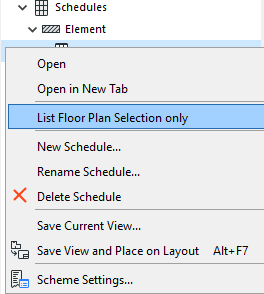
List Floor Plan selection only
This is a quick way to filter elements displayed in the schedule so it’s easier to edit them:
1.Select the desired elements (on the Floor Plan only). Use Find and Select if needed.
2.Select the desired schedule in the Navigator Project Map or View Map.
3.Right-click the schedule name and choose “List Floor Plan Selection Only” to view schedule data for the selected items only.
4.The schedule lists only selected elements which also meet the schedule Criteria.
Note: If you open a schedule based on Floor Plan selection, and then save a view from that schedule, it will not store the selection information. After a refresh, elements will be listed based on the Scheme Settings (not selection).