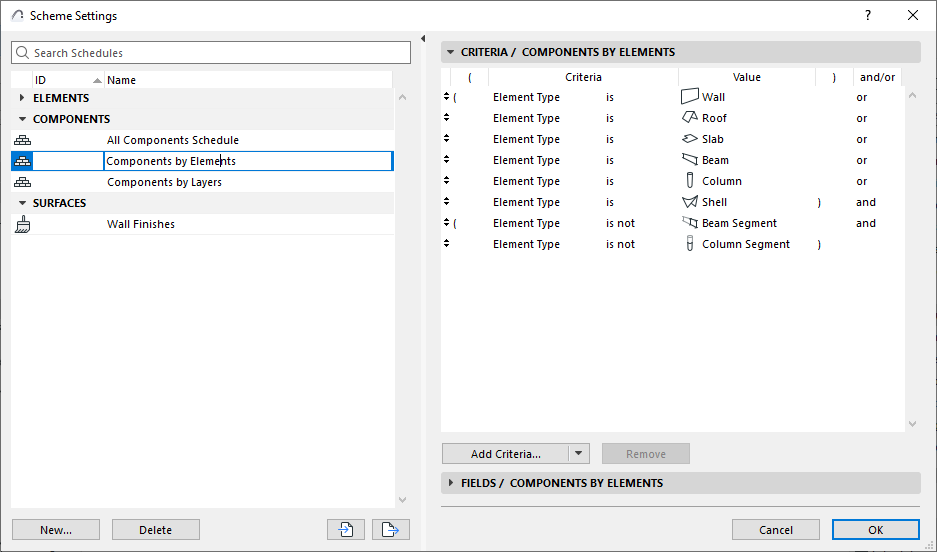
Schedule contents: Criteria and fields
Use Scheme Settings dialog to set up the criteria and fields of your Interactive Schedule.
To open it, do one of the following:
•Click Scheme Settings from the opened schedule window
•Use the schedule’s context menu in the Navigator
•In the Navigator Palette, select a schedule, then click the “Settings” button at the bottom of the Navigator.
•Use Document > Schedules > Scheme Settings
The left panel lists the project’s schemes, grouped by type (e.g. Element Schemes, Component Schemes).
•Click the panel header items (ID/Name) to sort them in ascending or descending order
•Select the scheme you want to edit, or use the buttons at the bottom to create, duplicate, delete schemes
•Create new schemes as needed (see Create a new schedule)
•You can rename the Scheme and edit its ID directly in this list
•You can also import and export schemes among projects as XML format files
The right side shows the Criteria and Fields of the selected schedule