Empty Row: Delete DN Value for Duct or Pipe Segment
When duplicating and editing tables of dimensions: Use the “Empty Row” command on the duct or pipe segment page to delete unneeded entries.
As a result, you may have to reassign element dimensions for existing model elements.
For duct or pipe segment:
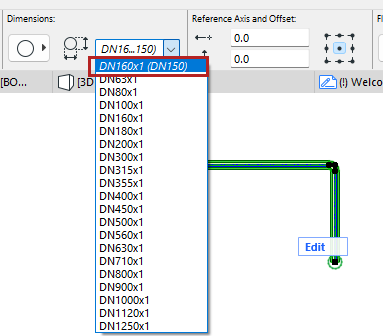
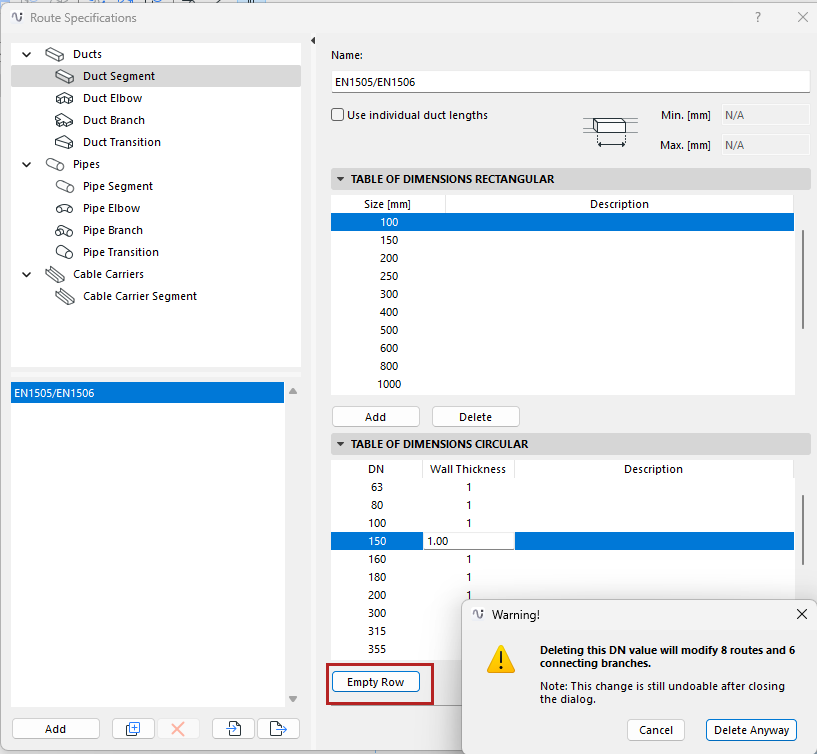
1.Select a DN row from the list.
2.Click the Empty Row button: This deletes the selected values. The DN is no longer available to assign to model elements.
3.Existing model elements using the deleted DN are automatically assigned a new DN value (the next larger one in the list.)
–In this case, you get a warning before you continue. You can undo the Empty Row command after you exit the dialog.
4.For each affected model element, the current and previous DN data is listed in italics. Of course, you can reassign their DN definitions as needed.