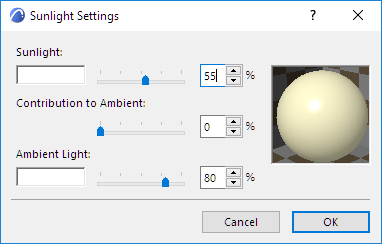
Sunlight Settings is accessible from:
•Context menu of a 3D view listed in the Navigator
•Camera Tool Settings: Click the Sunlight... button
•View > 3D View Options > 3D Projection Settings: Click the Sunlight... button
Sunlight Settings are relevant for:
•PhotoRenderings
•Sun Studies
•3D Projections (and views created from these)
Light Parameters
Set parameters for each component of the light: Sunlight (directional normal) and Ambient Light.
•Sunlight is the directional light falling on the project.
–Click inside the color sample box to choose a Sunlight color.
–Choose a sunlight color intensity between 0 and 100%. This Intensity value multiplies the Brightness component of the Sunlight color.
Note: The Sunlight color and intensity settings are considered by the Cineware Rendering Engine.
–Contribution to Ambient: Choose a percentage for how much of the Sunlight should be represented in non directional, ambient light.
•Ambient light is general, non-directional light that contributes to the overall brightness of the image, and can brighten otherwise overshadowed surfaces.
Note: Ambient light parameters affect only the 3D Window and PhotoRenderings created with the Basic Rendering Engine!
–Color: Click inside the color sample box to choose a color for the Ambient Light.
–Choose an Ambient light color intensity between 0 and 100%. Vary this value to obtain special effects in renderings.