Aligning Elements to a Surface in 3D
The Align to Surface relative construction method is only active when working in the 3D Window. It enables you to fit elements onto non-horizontal planes when working in 3D views.
See Editing Plane in 3D Window.
Using the Constraint when Creating New Elements
Using Align to Surface with Existing Elements
- Activate the 3D Window.
- Adjust the User Origin if necessary.
For more information, see Origins.
- Select the element you wish to edit.
- Choose the Edit command you wish to execute, e.g., stretch an edge of a slab to the intersection of a roof and the User Origin.
- Click a reference point or edge to start editing.
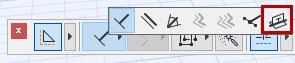
- Select the Align to Surface icon.
- Finish editing the element.