Walls and Other Elements
For information on how intersections (junctions) work among construction elements:
The following other features also affect Wall intersections:
- Columns and Walls
See Columns and Walls.
- The Connect commands can trim Walls to Roofs or Shells.
- You can also crop a Wall to a Single-plane Roof.
- The Adjust Elements to Slabs function lets you adjust Walls to specific levels of one or more Slabs that are located above and/or below them.
- Walls can be connected to Curtain Walls using the Design > Connect > Join Wall(s) to Curtain Wall. The same command is available under Design > Modify Curtain Wall.
- Relation to Zones: In the Model Panel of Wall settings, define how the Wall should behave in relation to Zones: As a Zone boundary (delimiter), or whether its area/volume should be subtracted from the Zone it is in, or whether it should have no effect at all on a Zone.
See Relation to Zones.
PolyWall Corners
When connected to other, plain walls, wall polygons keep their original contour by default.
You can override this default setting.
In the following example, a Single Wall is connected to a Wall Polygon.
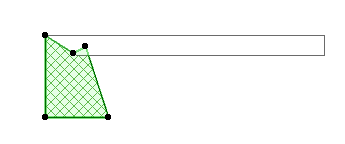
Now, check the PolyWall Corners Can Change box in the Geometry and Positioning section of the Wall Settings dialog box (available when a PolyWall is selected).
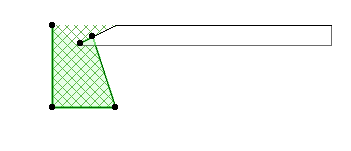
This effect is visible if you turn on View > On-Screen View Options > Clean Wall & Beam Intersections.