Schedule contents: Criteria and fields
Use Scheme Settings dialog to set up the criteria and fields of your Interactive Schedule.
To open it, do one of the following:
- Click Scheme Settings from the opened schedule window
- Use the schedule’s context menu in the Navigator
- In the Navigator Palette, select a schedule, then click the “Settings” button at the bottom of the Navigator.
- Use Document > Schedules > Scheme Settings
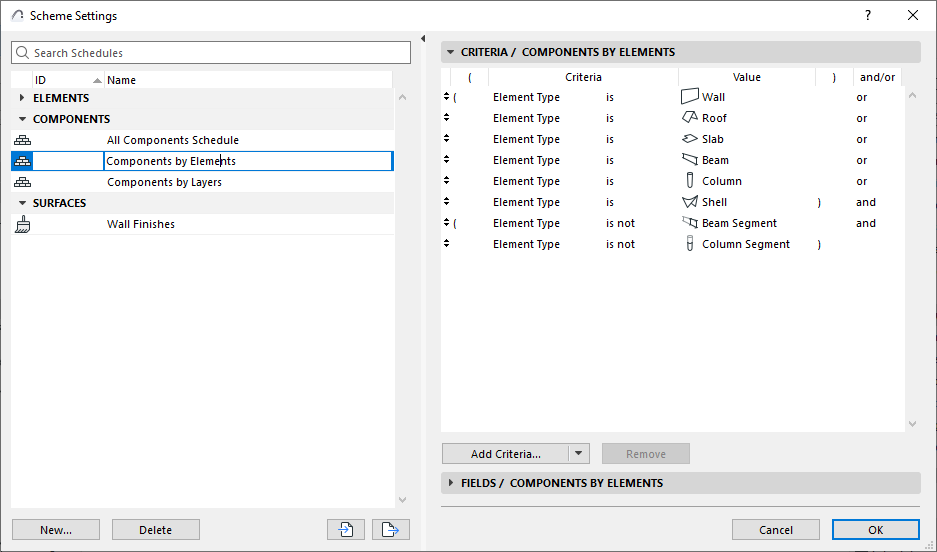
The left panel lists the project’s schemes, grouped by type (e.g. Element Schemes, Component Schemes).
- Click the panel header items (ID/Name) to sort them in ascending or descending order
- Select the scheme you want to edit, or use the buttons at the bottom to create, duplicate, delete schemes
- Create new schemes as needed (see Create a new schedule)
- You can rename the Scheme and edit its ID directly in this list
- You can also import and export schemes among projects as XML format files
The right side shows the Criteria and Fields of the selected schedule