Example 2: Stretch Beams to Columns
To illustrate this adjuster type, let’s use a common steel structure composed of Columns, Beams and diagonal bracing:
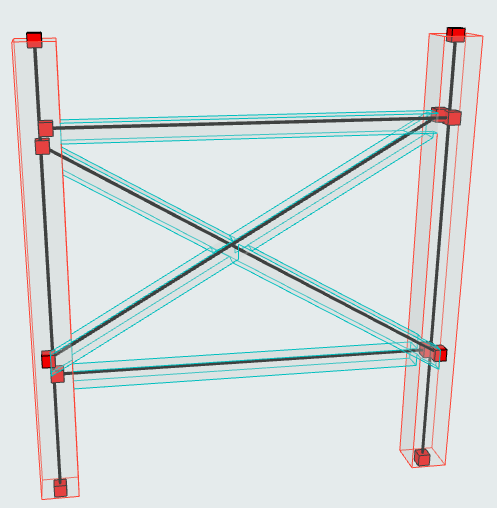
We see that the Beams’ 1D Members are not connected to the Columns: There is no continuity, which is necessary for structural analysis.
The solution is to generate a rule that stretches Beam axes to the Columns.
- Members Group 1: Beam
- Members Group 2: Column
- Method: one to the other (stretch the Beam to the Column, but leave the Column as is.)
- Adjuster type: Stretch
- Additional options for stretch: the maximum stretch allowed.Note: The defined tolerances are length-type values: The units specified for Length in Preferences > Working Units apply.
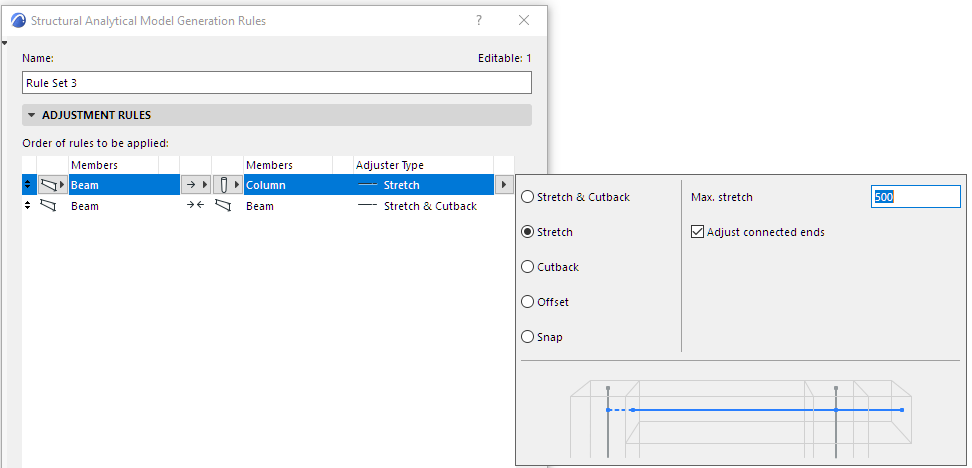
The Beams now meet the Columns, but the bracing is still not right.
See the next section to continue: Example 3: Snap.