Export SAF File from Archicad
Export is based on the SAF Translator settings of the current Archicad project. (See SAF Translators - Overview.)
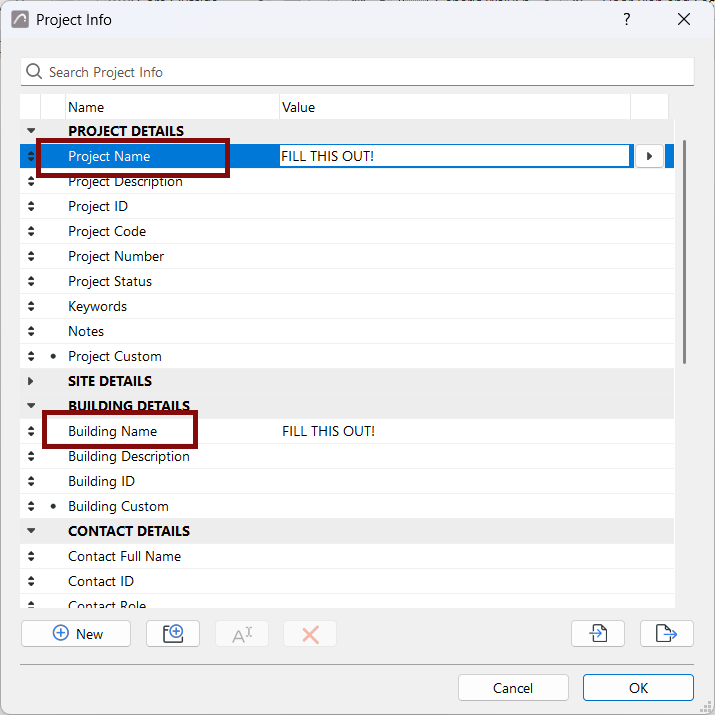
Tip: Before export, it is recommended to fill out the following
fields in the Project Info dialog box (File > Info > Project Info).
- Project Name
- Building Name
These data will be visible on the SAF file’s Project and Model Data tab pages.
To export the structural analytical model, do one of the following:
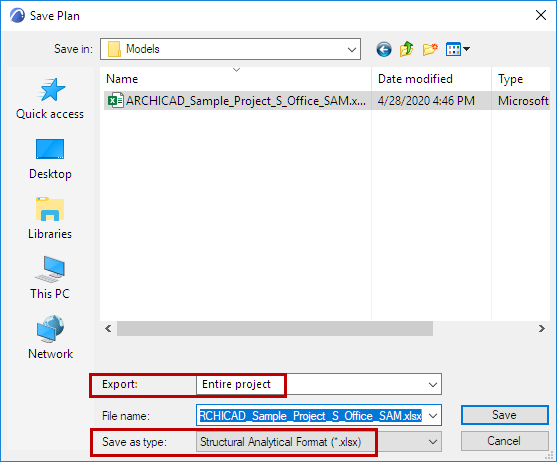
- From the Archicad project (Floor Plan or 3D Window), use File > Save as
- Choose Structural Analytical Format (*.xlsx)
- From the Export pop-up, define whether to export the Entire project, the
visible elements in your current view, or selected elements.
- Use Document > Publish to export the analytical Members visible in your published views. (See Publisher.)
You can also use a connection tool to specific analysis tools, for a faster workflow:
- Frilo Connection (developed by Graphisoft): see Export to FRILO .
- SCIA Connection (developed by SCIA), available for download here: Add-ons by Partners