Republish Hyper-model
You can republish an existing Hyper-model either from Publisher or the wizard.
Note: The Publisher method allows you to republish selected parts of the Hyper-model as needed. The wizard always republishes the whole thing.
From Publisher:
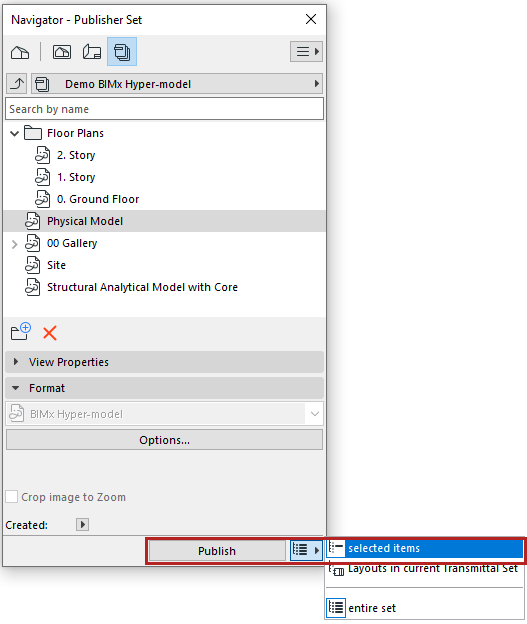
Republish selected items to update existing Hyper-model
Choose Selected Items to publish only the selected items (layouts or 3D models) and merge them into the previously published, full Hyper-model
You can then open the revised Hyper-model:
- BIMx Mobile: If the Hyper-model is revised on BIMx Model Transfer, the Mobile app displays green update icons next to the publisher items' names in the Hyper-model index. The transfer service also sends model update notifications to your mobile device (if notifications are allowed for BIMx).
- BIMx Web automatically opens the latest version of the Hyper-model, which is stored on BIMx Model Transfer or BIMcloud.
- BIMx Desktop also always opens the latest version if you republish selected Hyper-model items to the same location (path: local folder, mapped folder, synced cloud storage).
Republish selected items as new Hyper-model
Before republishing, remove the previously published Hyper-model from its saved location.
Archicad will publish only the selected items as a new, smaller Hyper-model, in place of the one you deleted (or moved).
From wizard:
- Use File > Publish BIMx Hyper-model.
- In the appearing dialog box, choose the desired Hyper-model.
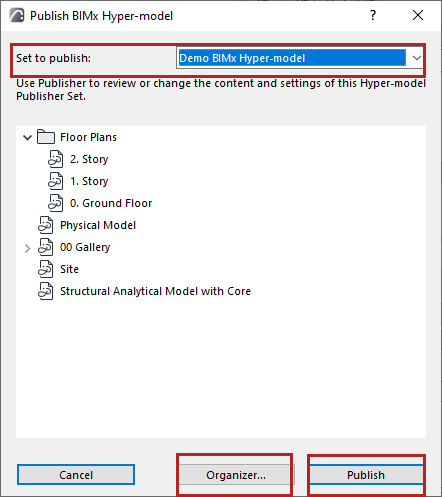
- Do one of the following:
- Click Publish to republish it unchanged; or
- Click Organizer to access the Organizer and modify the contents of the Publisher Set. In this case, you will follow the steps detailed at: Publish BIMx Hyper-Model: Publisher method (detailed method) .