Structure Property Settings (Energy Evaluation)
U-Value (R-Value) Calculator
U-value refers to the heat transmission coefficient of the selected structure. Use the U-value Calculator to estimate the thermal physics performance of the structures in your projects, based on the physical properties of the structure’s Building Material(s).
See U-value (R-value) Override.
Select any structure in the list. In the U-value column, click the three-dot button - with the lock icon set to closed (red) - to bring up the U-value Calculator dialog.
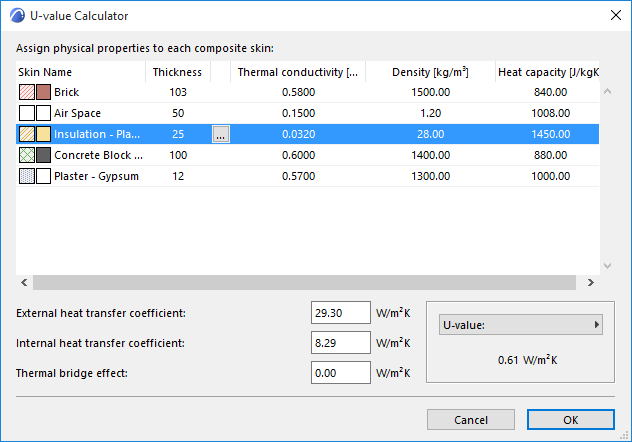
In the U-value Calculator, the skin(s) that make up the selected structure are listed with their relevant properties (Thickness, Thermal conductivity, Density and Heat capacity), each showing a default value.
Depending on local convention, you may prefer to use the R value (Thermal Resistance Coefficient), which is the inverse of the U value. To list and display R values instead of U values (both here and in the final Evaluation Report), click the U-value pop-up at the bottom right of this dialog box, and choose R-value.
External and Internal heat transfer coefficients, and the Thermal bridge effect related to structural surface area are shown at the bottom left of the U-Value (R-Value) Calculator dialog box. These data, in addition to the material properties, are necessary for the calculation.
The Calculated U-value is displayed in the bottom right corner of the panel.
U-value (R-value) Calculation Algorithm
The U-value Calculator calculates the average heat transmission coefficient of Building Materials and composite structures, based on a stationary algorithm that is used by most national standards.
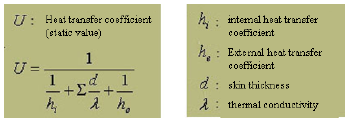
To include the effects of thermal bridges, delta U-values are added to the average U-values of structure group entries. The magnitudes of external and internal heat transfer coefficients and the delta U-value depend on the position of the evaluated structure relative to the thermal current. Default settings are offered within Energy Evaluation. However, it is advisable to review and manually override these predefined values if the structural situation demands, or if the standards for the project location are different.
Physical Property Assignment
View the skins listed in the U-value calculator. While the fill type, name and thickness of each skin is derived from the element’s settings in Archicad, the three properties to the right of the vertical line - Thermal conductivity, Density and Heat capacity - can be modified by you, if the default values here do not correspond to your actual project structures.
To change the Thermal conductivity, Density and/or Heat capacity value of any skin, select it from the list in the U-value Calculator.
Click the button with the three dots to access the Physical Property Assignment dialog box.
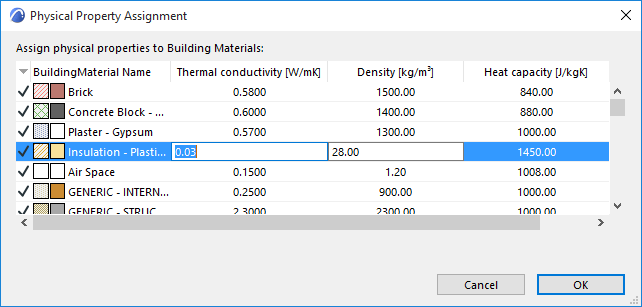
The Physical Property Assignment dialog box lists all Building Materials defined for this project. Those Building Materials actually used in this project are shown here with a checkmark in the far left column. Each listed fill is shown with the relevant physics properties that are assigned to it.
The Building Material you selected in the U-value calculator is highlighted in the list. Here you can edit any value, either directly or by choosing defined values from the Material Catalog.
Any change made here will automatically be reflected in all project elements that include the edited fill.
Material Catalog
Materials in Energy Evaluation represent physical properties (thermal conductivity, density, heat capacity, embodied energy, and embodied carbon). In the Physical Property Assignment dialog box, highlight a row and click the right-side Catalog button: This brings up the Energy Evaluation Material Catalog.
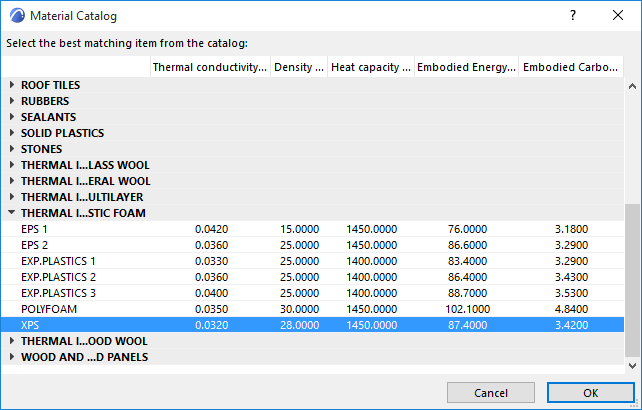
The Material Catalog is an extensive database integrated within Energy Evaluation that contains building material information relevant for the energy calculations (thermal conductivity, density, heat capacity, embodied energy, and embodied carbon). The building materials are grouped in main categories with drop-down detailed lists to enable easy access and quick selection.
Select a material here whose physical properties correspond to your needs. When you click OK in the Material Catalog, the thermal properties of the selected material are assigned to the Building Material you selected in Physical Property Assignment.
This way, the calculation engine obtains the physical data required for the thermal evaluation without any numeric input from you.
U-value (R-value) Override
It is possible to enter a U-value (or R-value) manually, instead of using the U-value calculator and Physical Property Assignment functions. Omitting the Physical Property Assignment greatly shortens the time needed to evaluate a project, but leads to somewhat less accurate results.
Select any structure in the list. In the U-value column, click the three-dot button - with the lock icon set to open (white) - to bring up the U-value Override dialog.
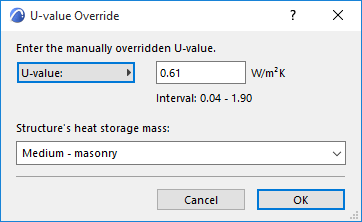
Click the pop-up to alternate between U-value and R-value as needed. Simply enter the desired value in the editable field.
Structure’s Heat Storage Mass
Use this pop-up (also in the U-Value Override dialog box) to select the thermal mass (Lightweight, Medium or Heavyweight) of the selected structure, instead of using the materials coming from the building model directly.
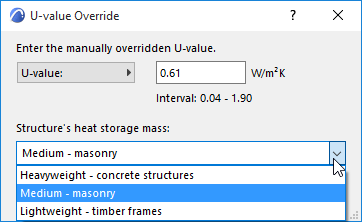
The threshold values for these categories are:
Within Energy Evaluation, these predefined settings are linked to mean density values. These density values are multiplied by the total volume of the interior structures, providing the numeric Internal heat storage mass value to the calculation engine.
Infiltration Settings
Modify the default Infiltration (unit: l/s,m2) of the selected Structures List entry to precisely define its air permeability (0.6 l/s,m2 is considered as low, while 1.6 l/s,m2 is considered as high infiltration).
The Energy Evaluation function of Archicad not only simulates the effect of infiltration on the hourly energy balance, but also displays the total Air Leakage in ACH (air change per hour), in the Key Values section of the PDF Energy Performance Report.
Solar Absorptance
The Surface material property determines the Solar Absorptance properties of the selected Structure. Modify the default Solar Absorptance (unit:%) of the selected Structures List entry to precisely define its capacity to absorb solar energy.