Create New, Custom IFC Property
IFC Properties are additional information items assigned to IFC entities. They are organized into property sets (IfcPropertySet).
buildingSMART defines standardized property sets for each supported IFC Schema, including IFC2x3, IFC4, and IFC4x3. Standard property-set names begin with the prefix Pset_.
You may wish to create a custom IFC Property.
- You can create a custom property for just a particular element, using either IFC Project Manager or the element settings dialog.
- You can also create a custom property for all elements of a particular IFC type (e.g. IfcCurtainWall): to do this, use the export translator's "Property Mapping for IFC Export." In that dialog, you can also create a mapping rule to assign values to the properties.
Create a custom IFC Property for an individual element
For the selected element, create a custom IFC property through either IFC Project Manager or the element settings dialog.
- Newly created IFC data will appear in the defined Property Set or under “Classification References” in the IFC Project Manager, as well as in the element Settings dialog among the listed properties.
- Such newly created IFC data appear with a red X in front, meaning that you can delete them at any time.
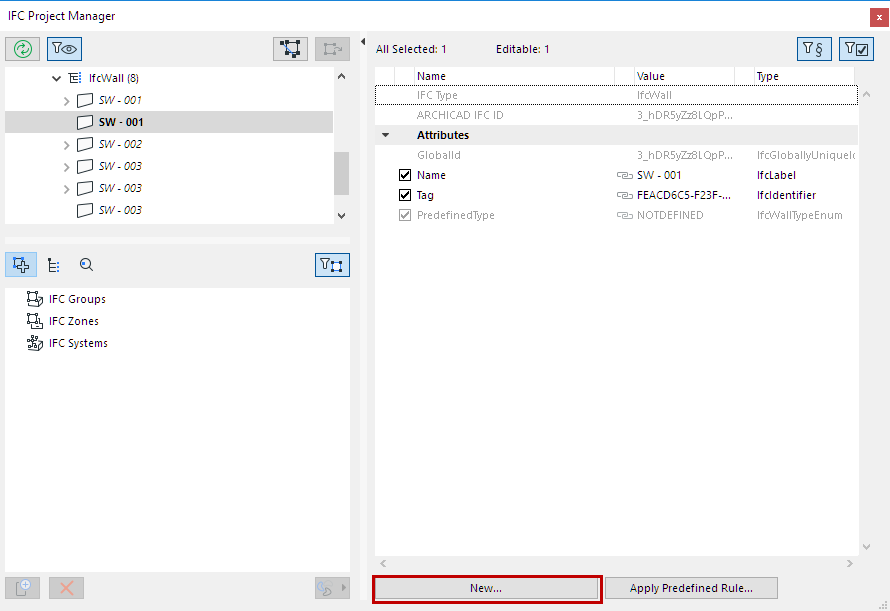
Create New IFC Property/Classfication
- Enter a new custom Property Set name; or else choose from the list of existing Property
Set names defined previously for the same element type (click the arrow icon to access
this list).
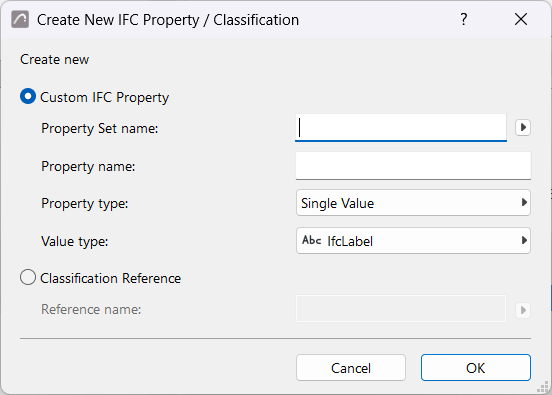
- Enter a new Property name.
- Choose a Property type (single, enumerated, complex, etc.) as described in the following table.
- Set the value type to label, text, integer, boolean, etc.
See also Unit Conversion for IFC Export
|
Property type |
Definition |
|
Single Value |
A property object which has a single (numeric or descriptive) value assigned. |
|
Enumerated Value |
A property object whose value is chosen from an enumeration. |
|
Bounded Value |
A property object which has a maximum of two (numeric or descriptive) values assigned, the first value specifying the upper limit and the second value specifying the lower limit |
|
Table Value |
A property object which has two lists of (numeric or descriptive) values assigned, corresponding to a table with two columns. |
|
List Value |
A property that has several (numeric or descriptive) values assigned, corresponding to an ordered list. |
|
Reference Value (IfcCalendarDate only) |
A property object which references to calendar date-type entity (day, month, and year). |
|
Value type |
Definition |
|
IfcAreaMeasure |
REAL type value of the extent of a surface. Value must be set in square meters, but is recalculated at export based on Area Unit settings. |
|
IfcBoolean |
A defined data type of simple BOOLEAN type. Value: TRUE or FALSE. |
|
IfcIdentifier |
An identifier is an alphanumeric STRING (max. 255 characters) which allows an individual thing to be identified. It may not provide natural-language meaning. |
|
IfcInteger |
A defined data type of simple INTEGER type. The number of bits contained in the IfcInteger is unrestricted, but in practice it is implementation-specific. |
|
IfcLabel |
A label is the term by which something may be referred to. It is a STRING (max. 255 characters) which represents the human-interpretable name of something and shall have a natural-language meaning. |
|
IfcLengthMeasure |
REAL type value of a distance. Value must be set in meters, but is recalculated at export based on Length Unit settings. |
|
IfcLogical |
A defined data type of simple LOGICAL type. Value: TRUE, FALSE or UNKNOWN. |
|
IfcMonetaryMeasure |
REAL type value of an amount of money without regard to its currency. The currency unit can be set at Currency Unit settings. |
|
IfcPlaneAngleMeasure |
REAL type value of an angle in a plane. Value must be set in radians, but is recalculated at export based on Angle Unit settings. |
|
IfcPositiveLengthMeasure |
Length measure shall be greater than zero. Value must be set in meters, but is recalculated at export based on Length Unit settings. |
|
IfcRatioMeasure |
REAL type value of the relation between two physical quantities that are of the same kind. Input given in percent is expressed as a decimal value: e.g. 25% becomes 0.25. |
|
IfcReal |
A defined data type of simple REAL type. The domain of Real is all rational, irrational and scientific real numbers. Here the precision is unconstrained, but in practice it is implementation-specific. |
|
IfcText |
Alphanumeric STRING of characters which is intended to be read and understood by a human being. It is for information purposes only. No character number limitation. |
|
IfcTimeMeasure |
REAL type value of the duration of time periods. The time unit can be set at Time Unit settings. |
|
IfcVolumeMeasure |
REAL type value of the solid content of a body. Value must be set in cubic meters, but is recalculated at export based on Volume Unit settings. |
|
More Types… |
See the definitions at “alphabetical listing” > “Defined Types”: https://standards.buildingsmart.org/IFC/RELEASE/IFC2x3/TC1/HTML/ |