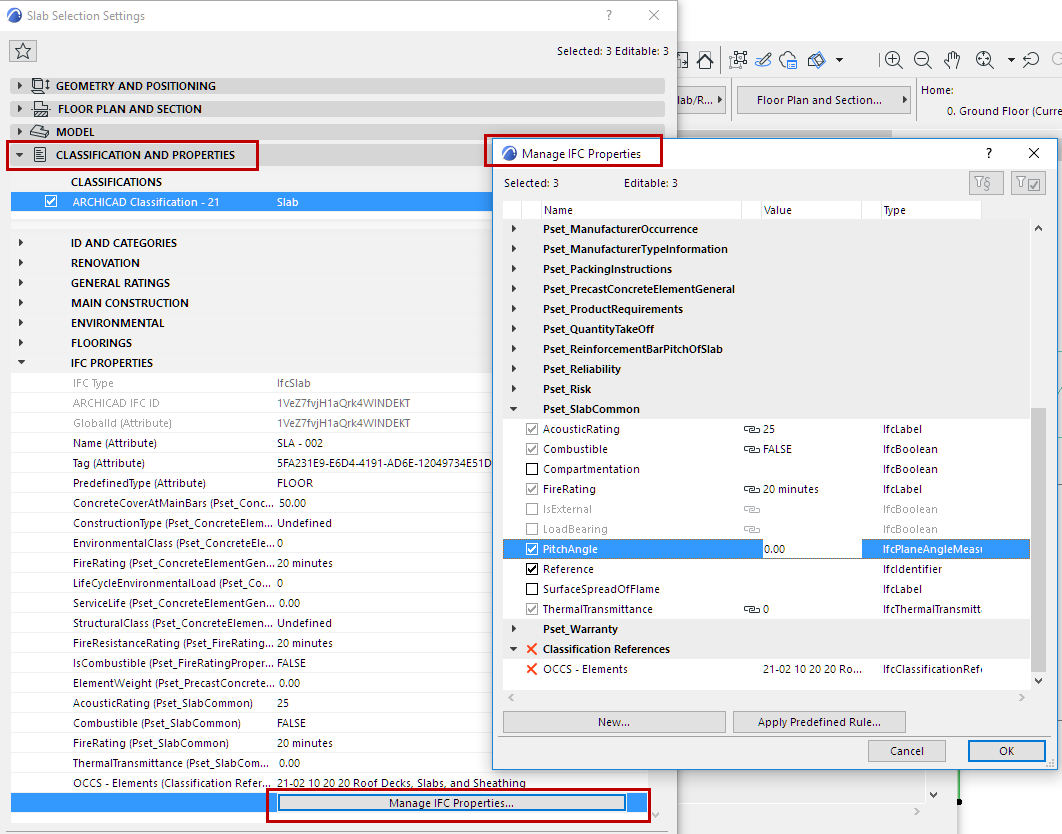
Elements created from imported IFC model elements display their standard
and custom IFC data in their Settings dialog boxes.
New IFC data can be added to the elements manually or automatically, based
on predefined rules in the Manage IFC Properties dialog, which is opened from Element
Settings (Classification and Properties panel). The interface of the Manage IFC Properties and
all its functions are the same as the right side of the IFC Project Manager dialog box.
The new data appear in the Classification and Properties panel of the
element Settings dialog, under IFC Properties. Here, you can assign values to the
available data fields that are still empty.
Working with IFC Data: Element Settings vs. IFC Project Manager
Element Settings dialog
IFC Project Manager
management level
element-level only
project level
IFC data owner
building elements
Zone (IfcSpace)
building elements
spatial elements:
IfcProject
IfcSite
IfcBuilding
Story (IfcBuildingStorey)
Zone (IfcSpace)
IFC Assignments
IFC Type Products
IFC Containers
Functions
collects and lists IFC data
enables you to create, edit and delete IFC data
enables you to use predefined rules
filters Mapping properties
filters only IFC data having values
collects and lists IFC data
enables you to create, edit and delete IFC data
enables you to use predefined rules
filters Mapping properties
filters only IFC data having values
navigates between the Archicad
model and the IFC
model
displays Zone (IfcSpace) containment
enables you to assign elements directly to the IfcSite or
IfcBuilding