Note: Not available in BIMcloud Basic.
The BIMcloud Delta Cache component optimizes data transfer between the ARCHICAD clients and a BIMcloud Server by caching the data on the client side. Once an ARCHICAD client downloads a part of the project, the data will be cached locally by the BIMcloud Delta Cache and offered to the next ARCHICAD client who requests the same data.
Install Delta Cache
1.Launch the BIMcloud Installer wizard.
2.On the wizard’s component selection screen, choose Install single component and choose BIMcloud Delta Cache.
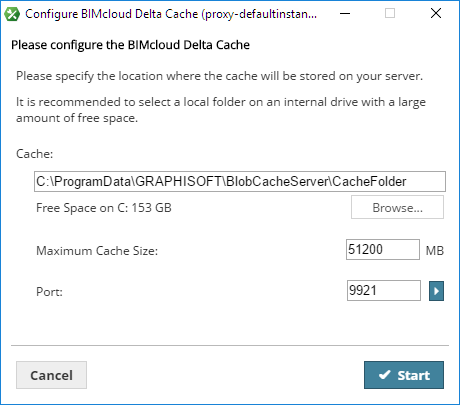
Configure BIMcloud Delta Cache
BIMcloud Delta Cache configuration takes place after you install a new BIMcloud Delta Cache.
Enter the following parameters:
•Port: Select a free port or use the “Pick free port” command to automatically find one.
•Cache folder: The BIMcloud Delta Cache will store temporarily cached data in this folder. Enter its path or click Browse.
•Maximum Cache Size: Enter the maximum size for the cached data. The more space you allocate, the more effectively the BIMcloud Delta Cache will operate.
Click Start.
To start using the BIMcloud Delta Cache, enter its address in ARCHICAD (Options > Work Environment > Network and Update).