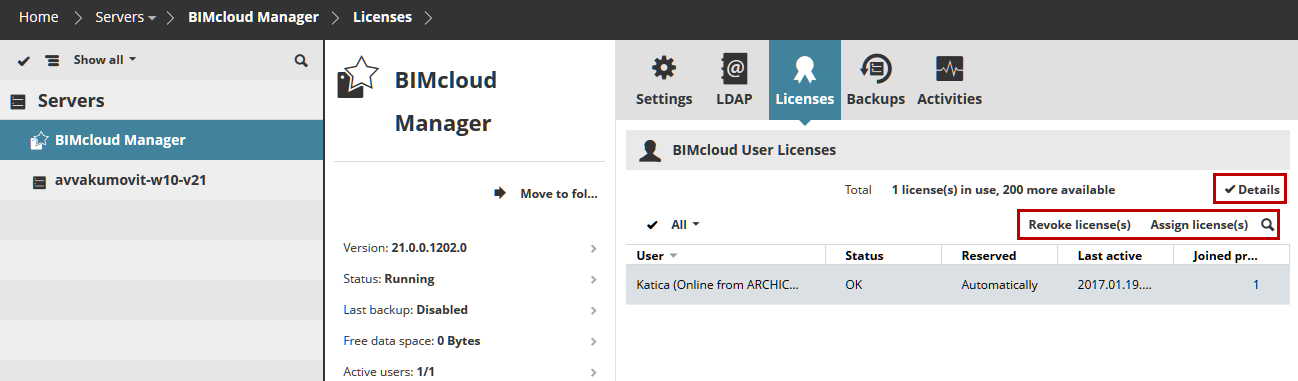
BIMcloud Manager - Licenses Panel
The Licenses panel gives an overview about the currently used, available and missing BIMcloud User Licenses.
Each user working on the BIMcloud requires one BIMcloud User License, regardless of how many projects the user is working on. A license is automatically assigned to the user when he/she joins a Teamwork project in ARCHICAD. A BIMcloud User License remains reserved until the user leaves his/her last project on the BIMcloud, or until it is manually revoked.
Once he/she joins again: if the user's license is missing (e.g. there are no more available BIMcloud User Licenses), then the user will be forced offline.
See The BIMcloud User License for more information.
If a License update is available, a Notification appears.
Note: To receive this Notification, you must turn on Check for Updates. Do this on the Servers page of BIMcloud Manager (Settings Panel/General Settings).
The list shows how these Licenses are currently used. Select the list row of the user to manage his/her licenses. The following functions are available:
Assign license(s)
Assigns a license to the user permanently. If the user already has an automatically reserved license, then it will be permanently assigned to him/her.
 Required permissions:
•Simplified management: Server Administrator
•Detailed management: Manage licenses
Revoke license(s)
Select the list row of the user and click the Revoke button to revoke his/her license. This will force the user to leave all his/her joined projects, and will be forced offline.
 Required permissions:
•Simplified management: Server Administrator
•Detailed management: Manage licenses
View License Details
Click the Details button to view additional license details, including:
•Source of the licenses (e.g. name of license server)
•Number of licenses available/in current use
•Type of license (e.g. FULL, EDU)
•Expiry date