Open BIMcloud Manager
Access the BIMcloud Manager interface in a browser
You can open the BIMcloud Manager web interface from any computer which has network access to the BIMcloud. Do any of the following:
- Navigate to the same URL in your browser as you use in Archicad
- From the BIMcloud tray application, click on BIMcloud Manager, then Open BIMcloud Manager command from the context menu
- From an Archicad Teamwork project, use Teamwork > Project > Open BIMcloud Manager
The initial server administrator signs on as the Master Administrator (masteradmin), and has full access to all controls. He/she then adds users and assigns them roles and permissions.
Note: Passwords on BIMcloud
Users who connect to BIMcloud via GSID manage their passwords on the GSID page.
- For local users on BIMcloud (non-GSID):
- Password must have at least 12 characters
- Password must include at least one of each of the following:
- a lower case letter from the English alphabet
- an upper case letter from the English alphabet
- a number
- a special character from the following list:
- . ! # $ % & ' * + = ? ^ _ ` { | } ~ -
The appearing home page provides shortcuts to the BIMcloud content types (available shortcuts depend on your permissions):
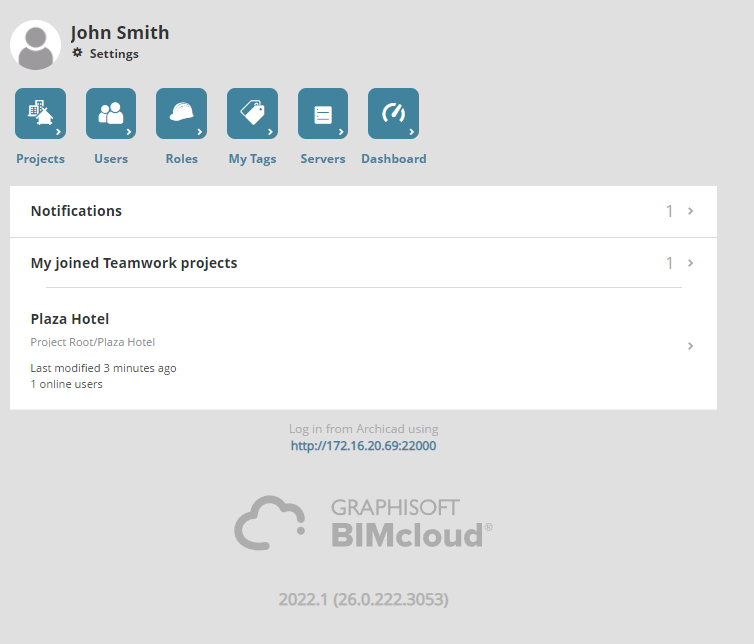
Projects
Users and groups
Roles
My Tags
Servers
Dashboard (visible to Server Administrators by default)