Edit a role
Fine-tune the permissions associated with a role
Go to the Roles page of BIMcloud Manager, and select a role to see its permissions.

Role permissions are divided into six groups of Archicad-related permissions, plus one group of Management permissions. Click the category headers to expand/minimize the lists in each.
See Archicad-related permissions and Management-related permissions.
Note: Management permissions are not available while using Simplified
Management.
Click Edit to edit permissions for the currently selected role.
Check/uncheck a box to add or remove permissions .
Check/uncheck a permissions group name to add/remove all permissions of that group at once.
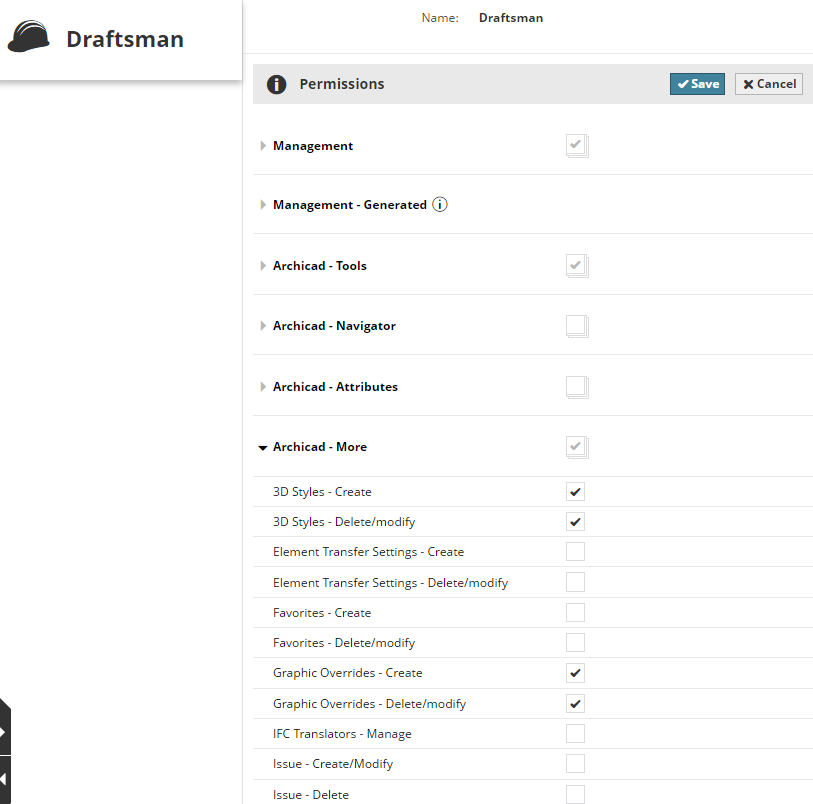
If the checkmark of a permissions group is grey, some (but not all) permissions from that group are enabled.