BIMcloud 幫助
ShowTopicInContext
  1. Home >
  2. BIMcloud 上的專案與檔案 >
  3. 使用標籤 >
  4. 移除標記

移除標記

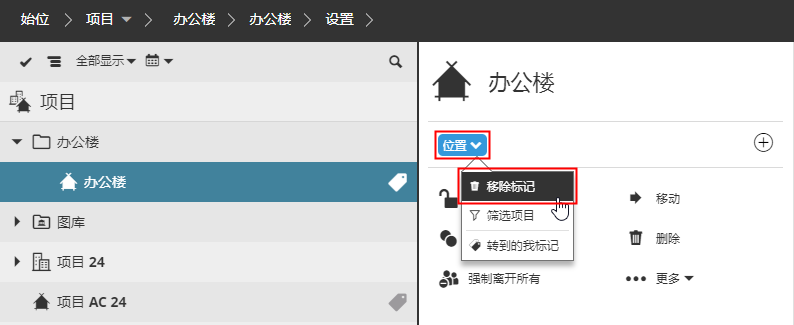
從專案內容項中刪除標記

  1. 開啟BIMcloud Manager的專案頁面

  2. 在導航器中選擇內容項。

  3. 在摘要部分點擊希望移除的標籤。

  4. 點擊移除標籤。


上層主題: 使用標籤
相關資訊
  • 標記內容項
  • 建立或複製標籤
  • 編輯或刪除一個標記
  • 使用標記查找內容項
Copyright © 2025 by Graphisoft. All rights reserved. Graphisoft is part of the Nemetschek Group