
License Manager Overview
As the user of ARCHICAD or other GRAPHISOFT products, you must have one or more protection keys, containing the appropriate license(s), in order to run the program.
The License Manager Tool can be used to manage the protection keys you have purchased, whether hard or soft.
Definitions
•A Hardware-Based Protection Key (Hardware Key) is a physical keyplug: either WIBU or CodeMeter.
•A Software-Based Protection Key (Software Key) is a software-based license key.
•GRAPHISOFT ID (GSID): GRAPHISOFT ID is an identification system for GRAPHISOFT websites. Some License Manager functions require that you sign in, using your GRAPHISOFT ID. If you don’t have one yet, sign up at https://graphisoftid.graphisoft.com/#/login.
•The Company License Pool is an online repository where all your purchased licenses are stored.
•Authentication Key - This is a unique, company-specific code used to identify your company for license management functions. To obtain one for your company, contact your GRAPHISOFT distributor.
Functions of the License Manager Tool
Use the License Manager Tool to manage all your protection keys, using the following functions:
•Update the licenses on your protection keys
•Download a Software Key from the Company License Pool
•Upload a Software Key from your computer to the Company License Pool
•Replace one type of protection key with another (e.g. from hardware to software, or from WIBU to CodeMeter)
Notes:
–To use the License Manager Tool, you must be connected to the internet.
–Some functions of the License Manager Tool also require you to sign in with your GRAPHISOFT ID.
–Replacement and update must be set up in advance with your distributor.
–A separate web interface is available for corporate-level license management functions.
See Managing the Company License Pool.
License Manager Tool Interface
The License Manager shows all of your protection keys and details on their licenses.
The top section (Available Protection Keys) lists each key that is plugged in to your computer or otherwise available to you.
The icon next to each key indicates the type of key:
|
|
This is a CodeMeter (Hardware-Based) Protection Key. |
|
|
This is a WIBU (Hardware-Based) Protection Key. |
|
|
This is a Software Key that has been downloaded to your computer. |
|
|
This Software Key is located in the Company License Pool. |
Note: In order to see the protection keys located in the Company License Pool, you must be signed in with your GRAPHISOFT ID.
For each key selected in the list, the current license status is indicated:

The Refresh button ensures that the list of available protection keys, and their status, are up to date.

The Content of Selected Key section shows you which licenses (if any) are on this key.

If the license requires an update (as shown below), then the Licenses After Update field tells you which licenses will be on the key after the update is finished.
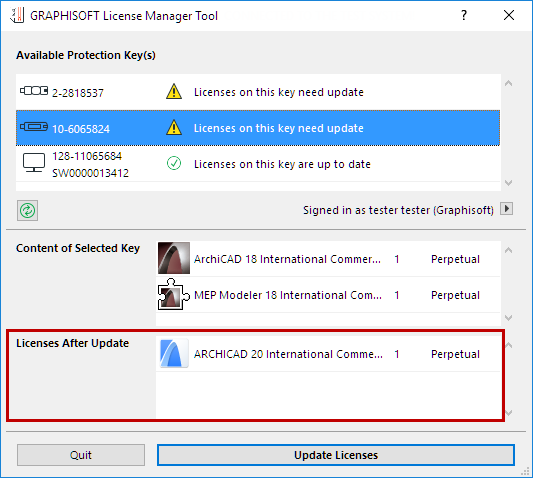
Depending on the selected key and the current license status, the License Manager automatically offers the needed function, e.g.:

•Update licenses on protection keys
•Download Software Key to Computer
•Upload Software Key to Company License Pool


