Define schedule fields for BIMx Info
You can set up one or more Interactive Schedule Schemes to define which element information should appear when navigating a BIMx Hyper-model in a BIMx application.
See Step 3: Info Set at Publish BIMx Hyper-Model from Archicad.
The program comes with a predefined Interactive Schedule Scheme to use in BIMx, but you can define any number of additional schemes.
Display a URL in BIMx Element Info
This Scheme-defined element info can include a URL - that is, a hypertext link to a website (e.g. manufacturer information) or project-related data (e.g. a location in Google maps).
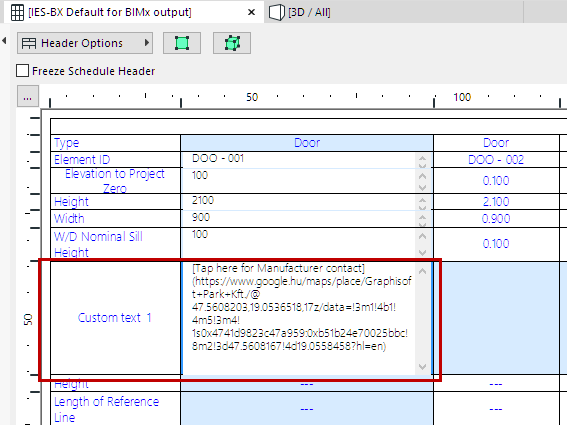
Any URL that appears in a schedule field will be included in the exported BIMx model - but if you prefer, you can modify the text displayed in the URL. Here’s the best way to do this:
1.In Scheme Setup, add a “Custom Text” field.
2.In the field, type what you want the BIMx user to see in brackets:
[Tap here for Manufacturer contact]
3.Immediately next to this - without leaving a space! - type the URL address in parentheses: