Add Criteria: Which elements should be listed?
Use the Criteria panel of Scheme Settings to define Element/Component/Surface Criteria for listing.
1.Open Scheme Settings
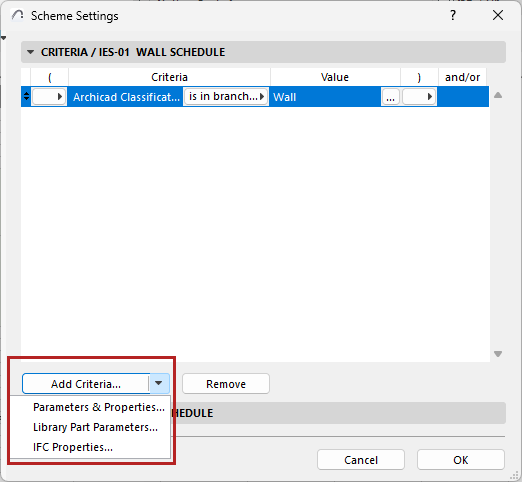
2.Click Add Criteria.
•By default, this button opens the list of Parameters & Properties available in the project (the list may be filtered depending on other criteria you have already chosen.)
•Criteria selection is common to several functions. For a description, see: Define Element Criteria.
•Or use the pop-up of the Add Criteria button to access Library Part Parameters or IFC Properties:
Additional Criteria and Fields: Library Part Parameters
Define Element Criteria using IFC Data
•To list multiple Element Types, you must join them with an OR statement.
•If needed, use the Open Parentheses and Close Parentheses columns of Scheme Settings to set up nested criteria for more complex schemes.
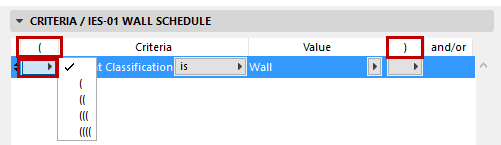
Each “open” must have a corresponding “close” in order for the scheme to be logical. If there is a mistake in your parentheses logic, the Criteria invalid! warning appears at the bottom of the panel.
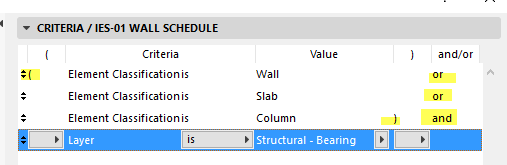
Suppose you want to list all the Walls, Slabs and Columns that are on a particular layer.
To meet this criteria, an element must:
1.be either a Wall OR a Slab OR a Column.
AND
2.be located on that particular layer
Note the parentheses in the image below, which enclose the group of three element types.