Attribute Handling Improvements
Attributes can be brought into a project very easily – via copy‑paste, hotlink placement, IFC/DWG imports, add‑ons, and ad‑hoc user actions.
New feedback in the Attributes palette now helps BIM managers to identify and manage these additional, sometimes unexpected attributes - before the non‑standard or duplicated attributes have spread through the model.
Identify newly created attributes
-
Creation Date
-
Created By
-
Creation Method - how the new attributes were added: via hotlink, paste, duplicate, explode, import...
-
Source File (such as hotlink file name or source file of pasted elements)
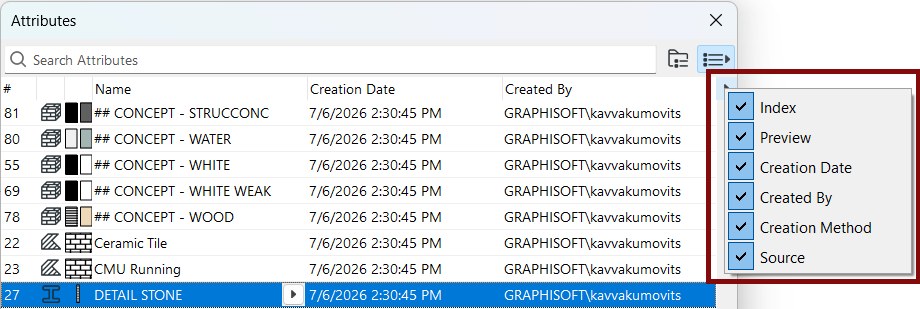
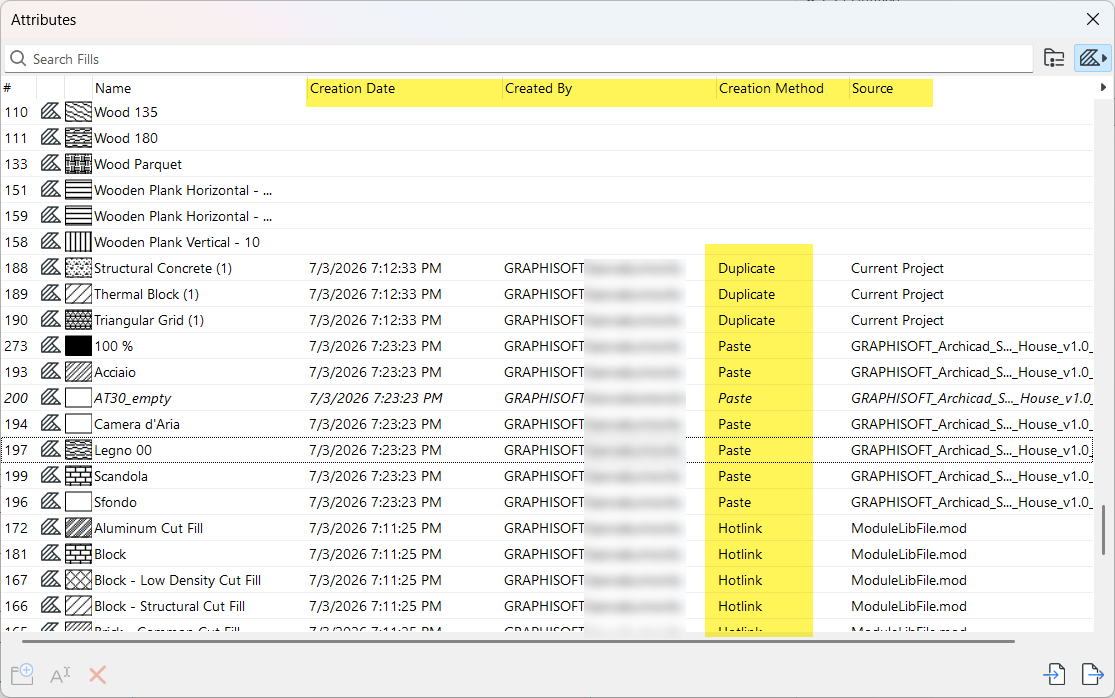
Drag the columns into any order and sort their contents using the headers.
All of the creation info (date, source, method) can be cleared once the information is no longer needed: select one or more attributes, then use the Clear Creation Info command from the context menu.
In Teamwork, deleting such data requires a new dedicated permission called “Creation Info - Clear”.
MASTER_GDL scripts no longer transfer with Paste
In previous versions, a project having one or more MASTER_GDL scripts would be unnecessarily included during paste or hotlink workflows. After library reloads, such scripts could cause the creation of new, unneeded attributes without the user being aware of it.
As of Archicad 30, such scripts are no longer included in paste workflows and are no longer merged into the host with hotlinks - preventing the creation of unwanted attributes.