Zone Categories
Each Zone you create in your project is assigned a Zone Category in the Zone’s Settings dialog box.
Zone Categories are attributes of the project.
Zone Category defines:
- the default color of the Zone background (for all Floor Plan Zones, and for cut Zones in Section-type views and 3D Documents), and
- the Zone Stamp object used for the Zone. (see Zone Stamps )
Zone Categories Dialog Box
To define or redefine Zone Categories, go to Options > Element Attributes > Zone Categories.
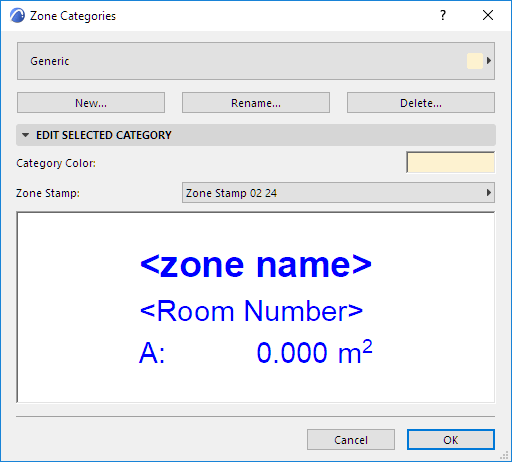
Use the pop-up at top to choose a Zone Category from list of predefined Zone categories. Either edit its properties directly, or choose one of the following commands:
- New: Create a copy of the selected Zone Category under a new name.
- Rename: Rename the currently selected Zone Category.
- Delete: Remove the selected Zone Category from the project.
See Delete attributes.
Zone Stamp pop-up: Choose a Zone Stamp from your loaded library.
Color: Choose a color for the selected Zone Category. (see Zone Stamps)
A preview window helps you visualize the Zone Stamp parameters.