Creating MEP Objects
Level of Detail definition of MEP Objects
|
Selected 2D Detail Level |
Default LOD |
Substitute LOD 1 |
Substitute LOD 2 |
Substitute LOD 3 |
|
Full |
Full |
Medium |
Low |
System 2D bounding box |
|
Medium |
Medium |
Low |
Full |
System 2D bounding box |
|
Low |
Low |
Medium |
Full |
System 2D bounding box |
|
Selected 3D Detail Level |
Default LOD |
Substitute LOD 1 |
Substitute LOD 2 |
Substitute LOD 3 |
|
Full |
Full |
Simplified |
Schematic |
3D not shown |
|
Simplified |
Simplified |
Schematic |
Full |
3D not shown |
|
Schematic |
Schematic |
Simplified |
Full |
3D not shown |
Additional components/assignments
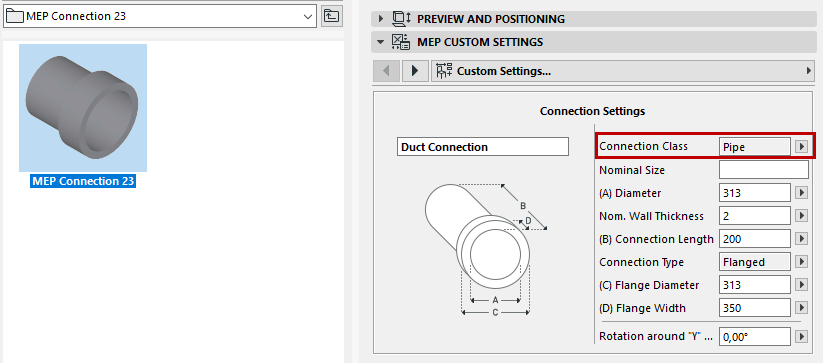
- For MEP objects, 3D Representation requires the use of the MEP Connection object (which can be found in MEP Library > MEP Connection), in order to facilitate the automatic connectivity of MEP objects.
- This MEP Connection component must be assigned to 3D Model Full.
- For Duct/Pipe Inline Flow Library Parts, there must be at least 2 MEP Connections, assigned to 3D Model Full. These must be placed on a single axis facing in opposite directions.
- When creating a Duct or Pipe MEP Library Part, make sure that the
MEP Connection component is assigned the corresponding Connection Class: Duct or Pipe.