Select Property Scheme
The new Library Part must include a set of listing properties. These listing properties will be available in the Descriptions area (Custom Settings panel) in the Settings dialog of the saved Library Part.
To define the Library Part’s listing properties:
In the Properties panel, select an option to define the Library Part’s listing properties:
Default Property Scheme
To populate the list for newly created objects, Library Part Maker uses the “Archicad Listing Parameters scheme” by default.
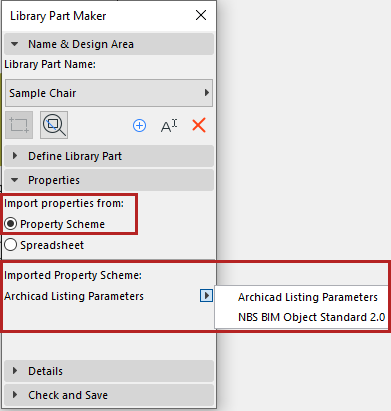
- You can create any custom parameter scheme instead.
- A custom scheme together with defined values can be imported directly
from an Excel spreadsheet.
See Customizing Data Properties for details on creating or importing a custom scheme.