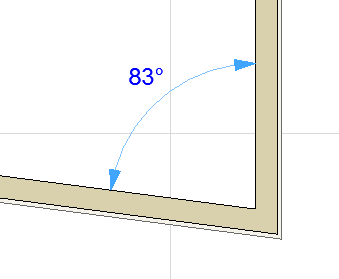
Angle Dimensions

Angle Dimensions display angle values


DimensionTools-3.png
  • between a pair of lines or linear edges
  • or the angle of a curved element
    Note: Angle dimensions are not available in the 3D Document Window.

Angle Dimension Construction Methods

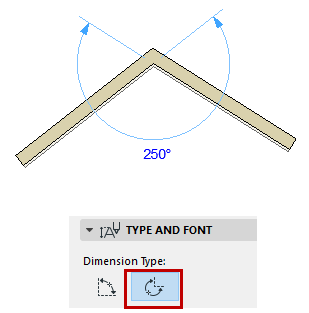
The Angle Dimension has two construction methods (choose from the Info Box or Angle Dimension Settings):
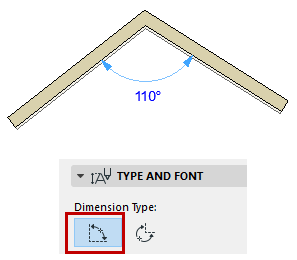
  • Inner Dimension (acute) construction method:

    AngleDim1.png
  • Outer Dimension (obtuse) construction method:

    AngleDim2.png

Place Angle Dimension Between Two Edges

To dimension an angle between two edges:

  1. Click an edge or line.
  2. Click a second edge or line.
  3. Click a third time to place the dimension of the angle.
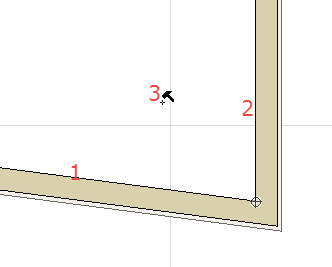
    AngleDimPlace1.png      AngleDimPlace2.png

You can also click on any four locations in the window or on a Guide Line, to define two vectors. Click again to place the angle dimension between the two vectors: In this case, the angle dimensions is not associative.

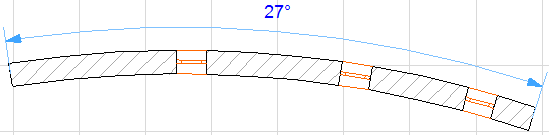
Place Angle Dimension on Curved Element

  1. Select the Angle Dimensioning tool in the Toolbox.
  2. Click the curved element. The two endpoints of the arc will be automatically marked.

    ArcAngle.png
  3. Click with the Hammer cursor to place the dimension.

    ArcAngle2.png