Route Segment Settings
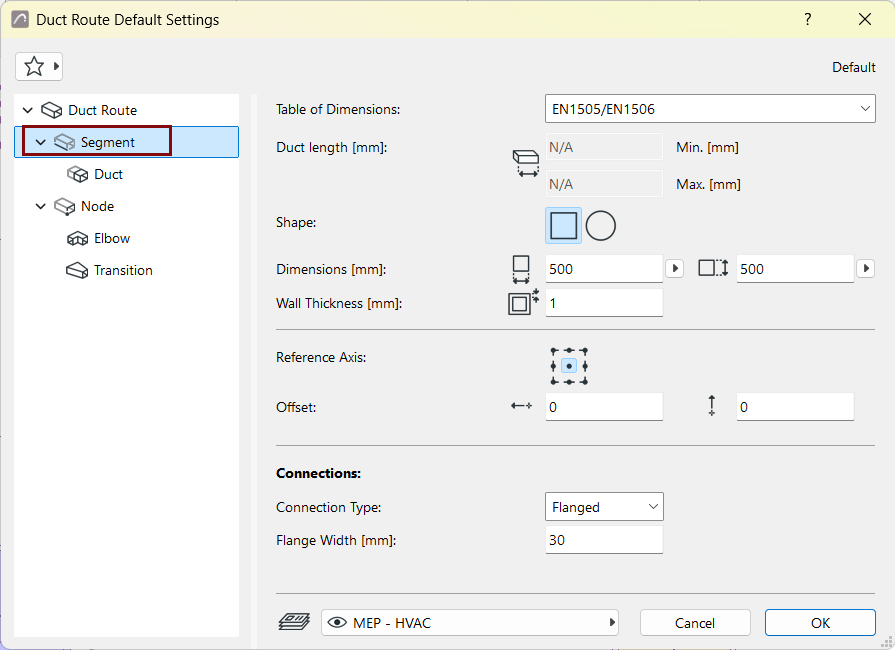
Table of Dimensions
Choose a Table of dimensions. (Define tables at Route Specifications.)
Duct length
This data is shown if you have set "Use individual lengths" in Route Specifications.
See Use individual lengths for pipes and ducts.
Shape
(Duct only:) Choose a cross-section: Rectangular or Circular.
Dimensions
- (Duct only:) For rectangular: Enter the cross-section dimensions.
- Choose a circular dimension standard from your defined Tables of
Dimensions. Note: You can customize the cross-section of any segment during input - see Change Route parameter on the fly.
Wall Thickness
Thickness of the MEP element wall.
Alignment and offset
See Edit segment reference line - alignment and offset
Connection Type
Choose the appropriate type (e.g. Flanged, Welded, Simple) - this varies depending on the Route type. Enter a width/diameter as applicable.
The segment’s elbows and nodes will use these connections accordingly.