Electrical Project Settings
Use this dialog to set project-level electrical settings.
Open the dialog:
- using the Options > Project Preferences > Electrical Project Settings menu command, or
- from the MEP toolbar.

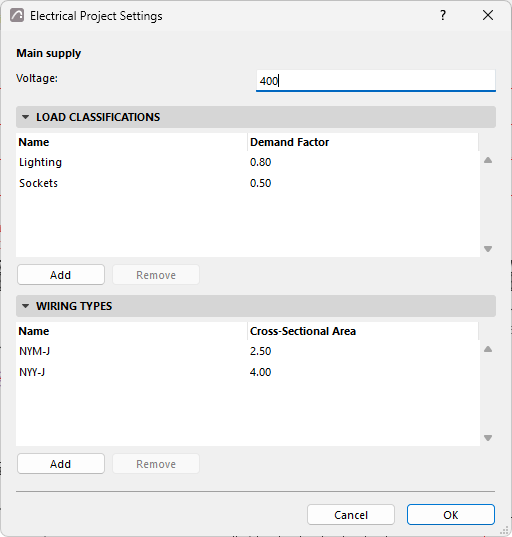
Main supply
Set the Voltage (in Volts - V) of the project’s main electrical supply.
Load Classifications
Specify the load classes used by electrical devices in the project. For each classification, specify Name and Demand Factor.
Note: Demand Factor is typically a numeric value between 0
and 1, where 1 means no reduction. It is the ratio of the realistic maximum demand of a
group of loads to their total installed (connected) load. The installed load is the
theoretical maximum that would occur if all loads operated simultaneously at full power. In
calculations, Demand Factor is applied to each device: the Apparent power (Load) of an
Electrical Device, in volt-amperes (VA), is multiplied by the Demand Factor of its Load
Classification to obtain its Demand Load, also in VA:
Demand Load = Apparent power (Load) * Demand Factor (e.g., 15 VA * 0.8 = 12 VA).
Wiring types
Specify wiring types used by circuits in the project. For each, specify its Name and Cross-Sectional Area (in square millimeters).