Advisory Messages (Energy Evaluation)
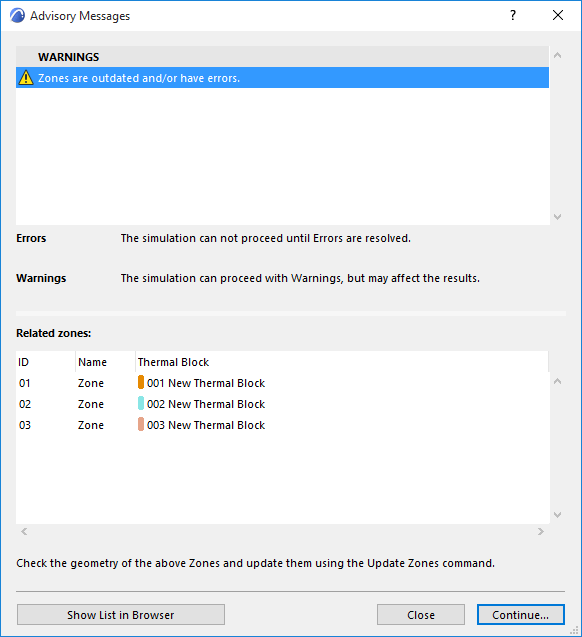
The “Advisory Messages” dialog box appears if:
Errors will be required to be resolved before continuing. However, resolving Warnings is optional.
Errors And Recommended Solutions
(mandatory to resolve before continuing)
- Physical properties of a used materials are not defined.
- Error icon: “Building Materials with missing properties”
- List of missing Building Materials
- To-do: “Select the relevant Building Material from the dedicated dialog box and enter the missing values (values are required to be more than zero) in the Physical Properties panel.”
- “Climate data is not available.” (missing or the server is not accessible)
- Error icon, “Climate Data is not available.”
- “To edit the Climate Data, open the Environment Settings dialog box from the Model Review palette.”
- “One or more used Building Material/Composite Structure is missing.”
- Error icon, “Structures with missing attributes.”
- List of structures with missing Building Material
- “Select the relevant model elements and edit its Building Material attribute.”
- “Energy simulation runtime error.” (engine errors during the hourly energy simulation)
- Error icon, “Simulation engine errors.”
- List of <Engine error code + description>.
- To-do: “Contact technical support:”
- “No valid Operation Profile selected.”
- Error icon, “Operation Profile is missing or not defined.”
- To-do: “Select an available profile from the Operation Profile dialog.”
- “Energy model analysis error.”
- Error icon, “Energy model analysis did not found any structure or openings.”
- To-do: “Check the geometry of the Zones and update them using the Update Zones command.”
Warnings And Recommended Solutions
(optional to resolve before continuing)
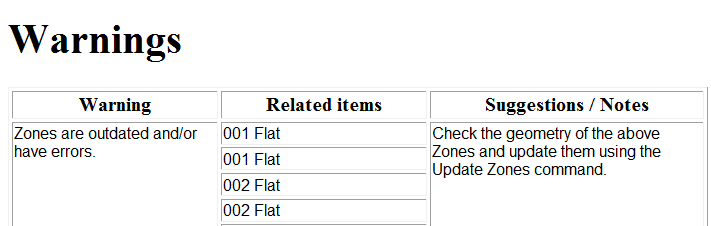
- “Zones are outdated and/or have errors.” (i.e. not up to date, overlapped zones, visible zones which are not assigned to any TB) - zones on hidden layers will not appear
- “Outdated zones:”
- List of Zones - Zone ID, zone name, thermal block name
- To-do: “Check the geometry of the above Zones and update them using the Update Zones command.”
- “Location data varies between project location and climate data.”
- Warning icon, “Location data does not match between project location and climate data.”
- To-do: “Either modify the project location from the Location Settings dialog box or modify the climate settings from the Environment Settings dialog box accessed via the Model Review palette.”
- Simplified building system is attached to a Thermal Block.
“Thermal Blocks with simplified building system:”
- List of Thermal Blocks - color swatch, number, name
- To-do: “Choose detailed settings from the Building Systems dialog and add the relevant details of HVAC systems used within building.”
- Warning icon, “Building shell is not closed because external wall contains empty opening.”
- To-do: “Review the Opening list and modify empty opening if necessary.”
- “Building shell contains one or more empty opening(s).”
On the Structures and Openings lists, a yellow warning exclamation mark appears next to those entries which contain faulty or missing data. (The problematic list items are also highlighted in pink.)