Reading the Energy Performance Evaluation - XLS Report
Click the button with the triangle in the bottom right corner of the Energy Model Review palette to save the detailed monthly energy balance data in Microsoft Excel file format.
Project Key Values Page
The Project Key Values section of the XLS Energy Performance Report displays basic information regarding the project. Its content is rather similar to the Key Values section of the Energy Performance Evaluation PDF report, yet it contains extra information about Climate Data, Design Loads and Advisory Messages (Errors and Warnings).
Below the Evaluation Date, Project Data such as Name and Location (with coordinates) is displayed, according to the user input on the Location Settings dialog.
Key geometry and shell performance metrics like Gross floor area, Ventilated volume and Outer heat capacity come from the Automatic Model Geometry Analysis.
Calculated heat transfer coefficients (see U-Value (R-Value) Calculator ) are listed for the entire building, for every Building structure group (see Structures Tab Page ) and for the openings on the building shell (see Openings Tab Page ).
Heating and cooling system Design Loads are simulation results that indicate gross system magnitudes.
Advisory Messages display the errors and warnings that occurred before and during the simulation.
Project Energy Report Page
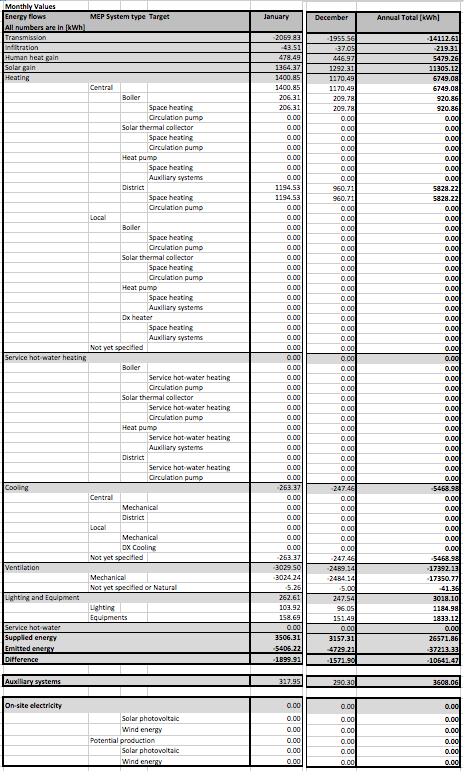
The level of data detail displayed on the Project Detailed Results tab page of the XLS Energy Performance Report exceeds the level of detail displayed on the Monthly Energy Balance bar chart of the PDF Energy Performance Report:
Detailed Inputs Page
This tab page displays building geometry information as it appears on the Structures and Openings tab pages. Use these data as input for third-party Excel-based stationary energy calculation software.