Element Classifications and Categories in IFC
Element Classifications for IFC
Structural Function Category for IFC
Element Classifications for IFC
You can optionally assign one or more classifications to any project element. A classification makes parameters and functions available to these elements for use by other applications: to organize project data, to make models transparent, to locate elements, for listing purposes, to share exact data, etc.
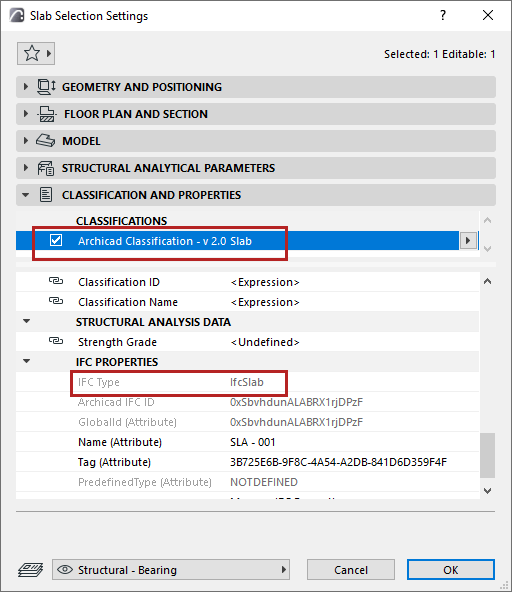
For each construction element, classifications can be set in the Classification and Properties panel of its Settings dialog box.
You can assign one Classification value per Classification System in the Elements’ Settings dialog, or from the Interactive Schedule.
Element classification affects the IFC export process: Each element is saved to the IFC model according to an IFC Type.
This is displayed in the “IFC Type” item in the Classification and Properties panel (under IFC Properties).
For more details, see Properties and Classification Systems.
Structural Function Category for IFC
“Load-Bearing Element” or “Non-Load-Bearing Element”
In collaborating with partners who are using structural programs, you can assign the “load-bearing” classification to elements and export this information with the IFC file.
The current IFC standard supports the export of the “load-bearing” IFC property only for the following elements: Wall, Slab, Column, Beam, Roof; elements classified as such in MEP Designer; and objects having these sub-types.
If you have classified elements as “load-bearing”, then you can use the Partial Structure Display “Core of Load-Bearing Elements Only” option to display those elements only. This is particularly useful if you wish to export only load-bearing elements to a structural engineer: In this case, just use the “visible elements” export mode on a view that uses this Partial Structure Display option.
See Partial Structure Display.
This category is useful for listing purposes - for example, you can calculate the materials needed for all load-bearing walls or columns, separately from materials of non-load-bearing elements.
Criteria in the Find & Select dialog box include: Search for those elements that have been defined as load-bearing or non-load-bearing, or whose Structural Function category is “Undefined”. Since IFC export can be limited to selected elements only, you can - for example - export all selected elements defined load-bearing (not just their Core only, as described in the example above).
See also Find and Select Elements.
The load-bearing data is also a standard property of exported elements. Moreover, if other applications (such as a structural program) also categorize elements according to their load-bearing function, you can filter for these elements upon importing them, and such elements will show up in the model with that classification.
Position Category for IFC
“Interior” or “Exterior”
This category is useful if you plan to send an IFC file to partners (e.g. energy analyzers) who are able to differentiate elements by their location in the building. When you export the model to IFC format, your model elements that are classified as “Interior” or “Exterior” will carry this information to the partner’s application via IFC.
Naturally, the opposite is also true. Since Position (IsExternal) is a standard IFC property for certain building elements (e.g. Wall, Slab, Column, or Beam), if an imported IFC model contains such data, then the appropriate category is automatically added to the respective elements.
Criteria in the Find & Select dialog box include: Search for elements categorized as either “Exterior” or “Interior”, or whose position is “Undefined”.
See also Find and Select Elements.
Interactive Schedule Criteria are also available to differentiate listed elements by Position.