Pens & Colors (DXF/DWG Translation Setup)
These are options in the DXF/DWG Translation Setup dialog box.
See DXF/DWG Translation Setup.
Archicad Pen Colors are configurable, while AutoCAD’s pen number association to colors cannot be modified.
You can convert Archicad Pens to AutoCAD Colors by searching for the best color match, or set up a conversion dictionary.
To convert by pen index numbers, use the default translator entitled “Keep Pen Index Number.” (Choose this option from the pop-up translator list at the top of the DXF-DWG Translation Setup dialog box.)
- If Background fill pen in Archicad is set to window background (-1), it will be converted to an AutoCAD Wipeout.
- A Patch object’s background fill color is assigned the window
background pen color (-1): As a result, the patch will be displayed correctly when the
background color changes. When the Patch is converted to AutoCAD, its background is
transformed to an AutoCAD wipeout (WPOut) without a frame, and will be displayed
correctly.Note: If you are using an AutoCAD version preceding AutoCAD 2004, Wipeout is available as part of “Express Tools.” Wipeout is integrated into AutoCAD 2004.
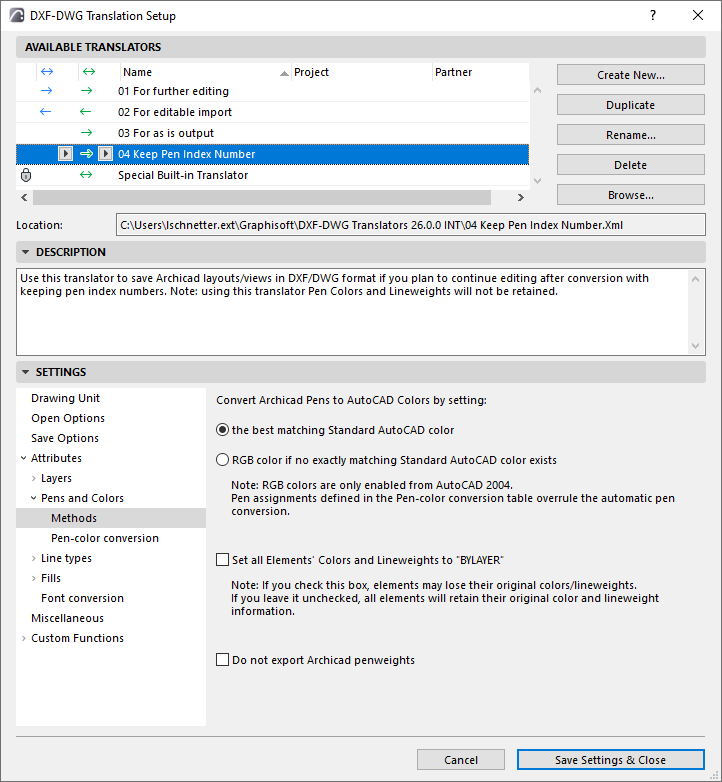
Pen Methods
Open
- Open: When you open a DXF/DWG file, the pen table of Archicad
is set to the AutoCAD colors. The pen numbers will be the same as the AutoCAD color
indexes in the DXF/DWG file.
Other Import: With any other DXF/DWG import operation, in which pens should not be altered (Merge, Attach XREF, Open Object, etc.), every AutoCAD color will be mapped to the Archicad pen with the most similar color (RGB) components.
Save
The following two options are available when saving to AutoCAD 2004 or later versions.
- Best matching Standard AutoCAD Color: With a Save operation, every Archicad pen will be mapped to the AutoCAD color with the most similar color (RGB) components.
- Note: A round-trip will not necessarily result in the same colors as the original. For example, if Archicad pen 25 finds AutoCAD color 236 the closest match, it is possible that AutoCAD color 236 will find Archicad pen 32 the closest match instead of 25. RGB Color: If no match exists, it will save the RGB value of the Archicad Pen and assign to it a pen index number of 256 or higher in the AutoCAD drawing.
Set All Elements’ Colors and Lineweights to BYLAYER
Do not export Archicad penweights
- For Save: With this option, penweights of Archicad Pens will not be exported to the resulting AutoCAD drawing.
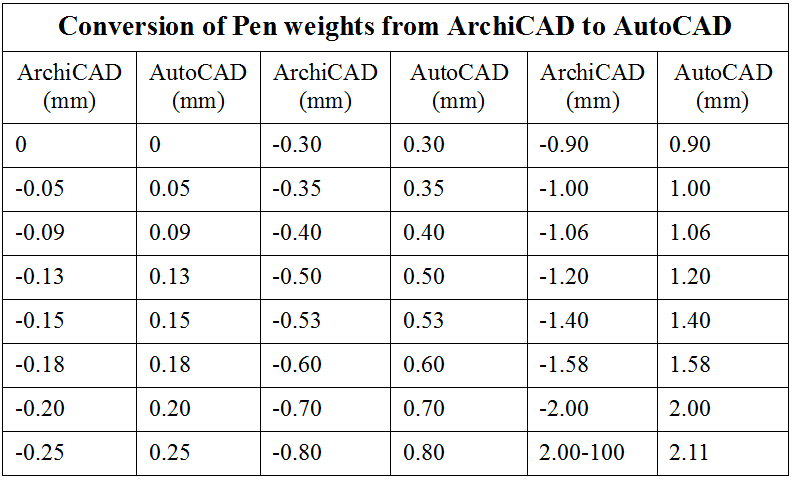
The following table shows how Archicad penweights are converted to AutoCAD penweights when this checkbox is not checked and penweights are exported.
Pen-Color Conversion
Check the box to enable settings for conversion between Archicad Pens and AutoCAD Colors .
These settings take precedence over the automatic conversion methods set on the Methods page.