Billing for subscription renewals (as of September 2025, until further notice)
My subscription was renewed earlier this year (after January 16, 2025). Why am I getting an invoice now?
Starting in January 2025, Graphisoft temporarily paused billing due to the change in payment provider. Despite this pause in billing, we renewed your subscription as usual so you could keep working without interruption. Now that our payment system is back on track, we have resumed billing of subscription renewals. Your current invoice covers all your renewals since January 16, 2025.
Why did I receive multiple invoices?
If you have multiple subscriptions for the same product, FastSpring will create a separate invoice for each subscription.
Which payment methods can I use?
Available payment methods depend on your location. Please check your emails and open the invoicing email. Click the View invoice & pay button. This directs you to your payment provider’s page, which shows the payment methods available in your location (credit card, bank transfer, etc.)
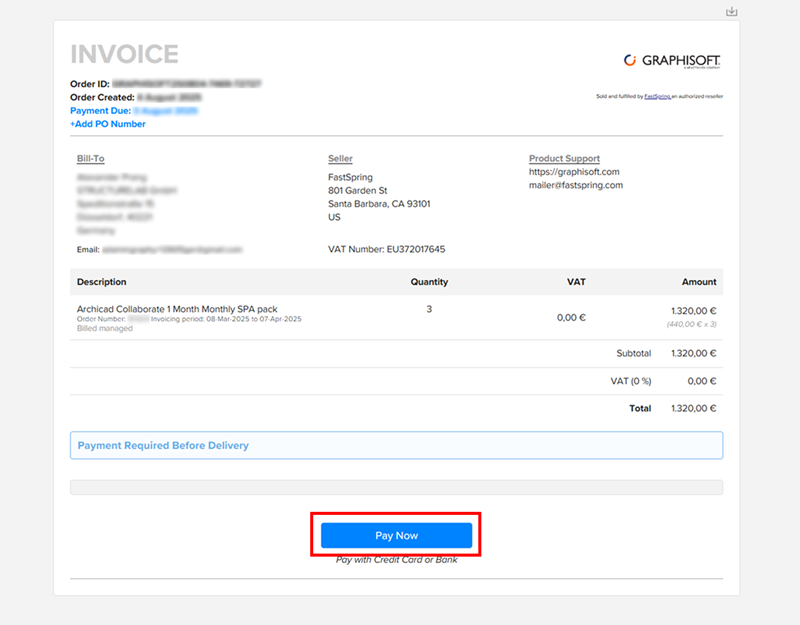
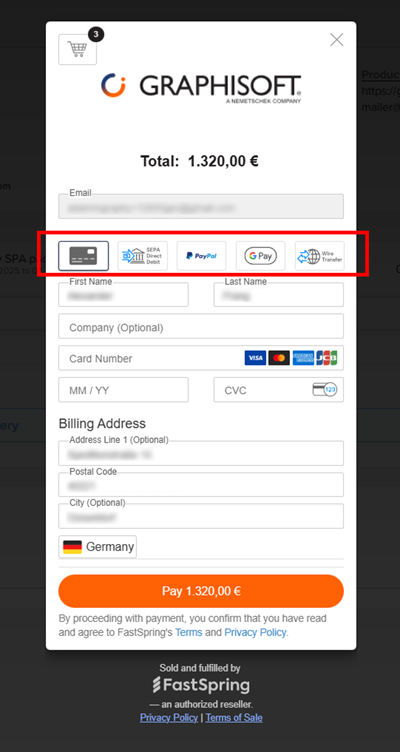
My billing information on the invoice is incorrect. What should I do?
You can edit your billing information directly on the invoice, before clicking Pay Now. The receipt, issued to you by FastSpring upon receipt of payment, will display your updated billing information.
Where applicable: please make sure that the billing address provided is the same as your “ship-to” address, which is used to calculate your sales tax.
Can I pay in installments?
Yes! If you have a monthly subscription, you can request to pay in installments, if you submit this request by the deadline provided in the invoicing email. In this case, please visit our support site, sign in with your GSID, then submit a request - by the given deadline - under “Graphisoft Store Support > Invoice & Billing”.
What happens if I don’t pay my invoice in time?
Please pay your invoice by the payment deadline. If you miss the deadline and the 30-day grace period, your subscription will be canceled immediately and you will lose access to your products. Even if your subscription is canceled for non-payment, you are required to pay the outstanding amount due, as outlined in our Terms of Service. If your subscription includes BIMcloud SaaS, you will also lose the content stored on your BIMcloud after the specified Reactivation Period expires. (If you purchase a new subscription within the specified period, your BIMcloud data will be retained; you can reaccess it with your new subscription.)
What will happen at my next, regular renewal?
Your subscription will be automatically renewed in accordance with the Terms of Service. Invoicing and payment will take place according to the current procedure.
I have further questions. Whom should I contact?
We’re happy to help! Please visit our support site, sign in with your GSID, then submit a request under “Graphisoft Store Support > Invoice & Billing”.