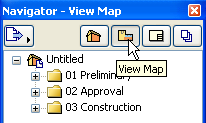
The Navigator Palette (Navigator) is a tree structure that lets you build up the entire logical structure of your project and navigate within it. You can create folders, then copy, drag and drop views and other project items depending on their particular purpose. The Navigator also lets you access views and layouts from external ArchiCAD files and place them into the Layout Book of your current project. Finally, you can configure the outputs for publication using Navigator controls.
The Navigator displays the whole project’s tree structure in four different maps.
•The Project Map provides a tree structure of the components (viewpoints) of your Virtual Building Model.
•The View Map includes all the predefined and custom-created Views of the Project File.
•The Layout Book contains the layouts defined for the entire architectural project.
•The Publisher Sets map is a tree structure in which you define sets of views for various output purposes (printing, plotting, or saving to a local disk).
To switch from one map to another, click among the four buttons at the top of the Navigator. The palette’s title bar indicates which map is currently displayed.
The Navigator item currently open in the window is shown in bold.
The Navigator has a special double-tree view, called the Organizer, which makes it easier to move items from one map to the other.
Important: Operations involving Navigator/Organizer items (such as drag and drop between Navigator maps, deleting items from a map, or adding items to the Publisher set) are not added to the undo queue, and are not undoable.
Related Topics: