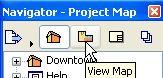
Use the four buttons at the top of the Navigator Palette to choose a Map to display in the Navigator.
From left:
•Project Map
•View Map
•Layout Book
•Publisher Sets.
Refer to the Tool Tips to learn which icon refers to which map.
The palette caption indicates which map is currently displayed.
The following sections describe the controls in the Navigator’s Project Chooser menu, plus all maps of the Navigator.
For a description of how to use the Navigator and Organizer in building up and managing your project, see: Navigator Palette and Layout Book Components.