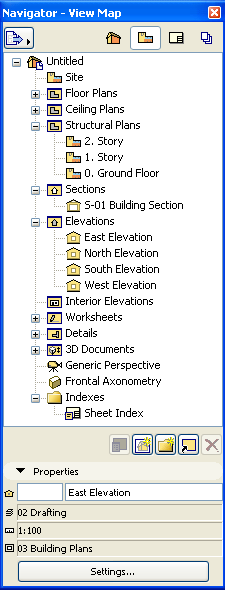
With the second button in the Navigator Palette, you will display the Navigator View Map: the list of saved Views available in your project file.
See also View Map Controls.
A View is a stored version of a Viewpoint; each view is defined by its adjustable View Settings that you configure for a particular purpose as you construct your Virtual Building. Every saved view is listed in the Navigator Palette’s View Map. The Properties section at the bottom of the View Map provides feedback on the settings of the selected view. To modify view settings, select the view and click Settings at the bottom of the View Map to access View Settings. Views can be created within the active project or imported from other ArchiCAD projects.
For more information, see Saving a View.
In the View Map, several view folders are predefined; you can rename or delete these, and add new folders as needed.
To gain an overview of View Map items or to sort them by criteria, use the Project Indexes function.
See Project Indexes.
Even if the project content changes, the settings of your saved views - will remain unchanged unless you expressly modify them.
Note: You can create a dynamic connection between project viewpoints and views if you clone a folder.