Use the polyline or one of the rectangle methods to create multiple viewpoints in a single IE Group.
The resulting Interior Elevation group contains the same number of viewpoints as the number of segments on the polyline/rectangle.
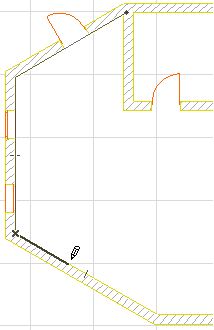
1.Click to begin drawing the limit line.
•With the polyline method, click once for each segment of the polyline; double-click to complete the polyline.
•With the rectangular method, click a second time to define the opposing corners.
•With the rotated rectangular method, click to define the rotation vector; click again to define the length of the rectangle.
The resulting line/polyline/rectangle represents the limit line of the Interior Elevation group.
2.Move the cursor to the desired view position.
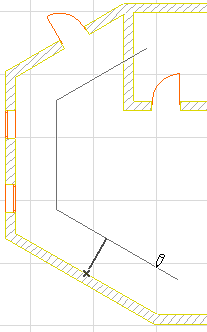
3.Click once more to place the IE marker(s).
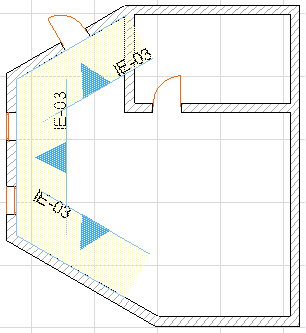
Interior elevations use a dedicated IE marker, a GDL object with editable parameters.
IE marker(s) are placed at the middle of each segment of the IE line or at the center of the room.
To define the Marker style and Position, use the controls in the Marker Panel of Interior Elevation Settings. For any or all of the viewpoints, you can opt not to show a marker, by choosing the No Marker option in this panel.
See Interior Elevation Marker Panel.
4.The new group of viewpoints is created and listed in the Project Map.
5.The Interior Elevation Group has its own Clone folder in the Navigator View Map.
The viewpoints within a single IE group share certain settings (such as Show on Stories and Layer settings) which can be applied only to the group as a whole. However, the settings of any single segment are accessible individually.
See Editing Interior Elevation Viewpoints.
Many other aspects of Interior Elevation viewpoints - status, display, marker reference, and updating - work the same as in Section viewpoints.
For more information, see the following topics:
Model Display in the Section Window