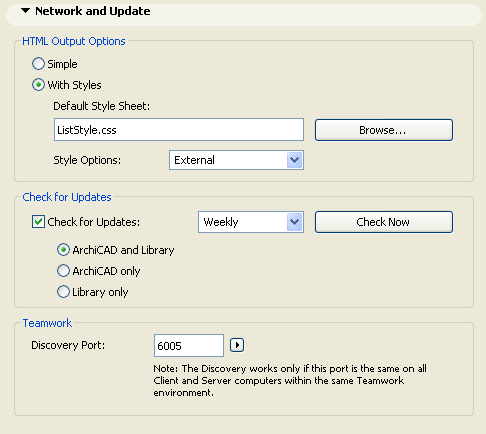
Use this screen (Options > Work Environment > Network And Update Options) to define options related to the Internet and HTML format.
HTML Output Options: Choose a style to use when saving data in HTML format, e.g., from a list-type Window in text format.
Simple: Choose this to display the HTML file without styles.
With Styles: Choose this to display the HTML file using the Style Sheet formatting below. (Click Browse to find and use a different style sheet.)
Style Options: Choose External if you want the resulting HTML file to include a link to the chosen Style Sheet. Choose Internal if you want to include the Style Sheet itself as part of the HTML file.
Check for Updates: Check this box if you want automatic notification - when starting ArchiCAD - if a new ArchiCAD or Library update (Hotfix) becomes available. You will be notified with an on-screen Alert if the Check for Update function is run. This function only works if you have a live internet connection.
•Use the pop-up to set how often you want to run Check for Updates (Daily, Weekly, or Monthly.)
•Click Check Now to check for updates immediately.
•Set the components (both ArchiCAD and Library, or either one) for which you wish to Check for Updates.
Note: The Check for Updates does not download anything to your computer automatically. It only provides a notice that such a download is available.
Check for Updates will provide automatic information about your ArchiCAD version to the GRAPHISOFT website. These data are limited to the data needed in order to update; they include no personal information.
Teamwork Discovery Port: This setting defines the port on your computer used for the “Discovery” function, which helps you connect to the BIM Server.
See Choose BIM Server.